Disclosure: We’re the team behind Kaizen Daytrading. In this guide, we feature our own indicators with detailed descriptions since we know them inside out. We also mention competitor products with links so you can compare. We have not personally tested every competitor product listed here — descriptions of competitors are based on their published feature lists.
If you trade futures on NinjaTrader 8, you already know that price charts alone only tell half the story. The best NinjaTrader indicators for serious day traders are order flow indicators — tools that break apart each candle and show you the actual buying and selling activity happening inside. Footprint charts, volume profiles, cumulative delta, VWAP, TPO, big trade detection — these are the NinjaTrader add-ons that separate recreational traders from professionals who can read the auction in real time.
But the market for NinjaTrader 8 indicators is crowded. Some tools are free and built-in. Others cost hundreds of dollars per year on subscription plans. Features overlap, marketing copy blurs together, and it is genuinely hard to figure out which order flow indicators are worth your money.
This guide fixes that. We will walk through every major category of order flow indicator, explain exactly what to look for, recommend our top pick in each category, and mention the alternatives so you can make an informed decision. By the end, you will know which tools match your trading style and budget — whether you are just getting started with order flow or building a professional-grade workspace. If the concept itself is new to you, start with what order flow is and come back.
Looking beyond order flow? Our best NinjaTrader 8 indicators guide compares every indicator category, the free options and the other major vendors side by side.
What Makes a Good Order Flow Indicator?
Before we get into specific tools, it helps to understand the five qualities that separate a good order flow indicator from a mediocre one. These are the criteria we used to evaluate every tool in this guide.
Tick-Level Accuracy
The most important question you can ask about any order flow indicator is: how does it classify trades as buys or sells?
The gold standard is tick-level bid/ask classification. Every incoming trade is stamped as a buy (executed at the ask) or a sell (executed at the bid) based on the actual trade price relative to the current best bid and ask. This requires processing every single tick — no shortcuts.
Some indicators skip this and estimate delta from candle OHLC data, or they use minute-level sampling instead of true tick data. The result looks similar on a chart, but the numbers are wrong. If your footprint chart or CVD is built on estimated data, you are making decisions on noise.
When evaluating NinjaTrader indicators, always check whether the tool uses tick-level data or approximations. If the vendor does not mention it, that is usually a red flag.
Configurability
Order flow indicators are not one-size-fits-all. A scalper trading ES on a 1,000-tick chart needs different settings than a swing trader watching NQ on 15-minute bars. A good indicator gives you control over the parameters that matter — thresholds, display modes, visual options — without burying you in 50 settings that nobody understands.
The sweet spot is usually between 4 and 25 well-chosen settings. Fewer than that and the tool is too rigid. More than that and it becomes a configuration project instead of a trading tool.
Performance
Order flow indicators process a lot of data. A footprint chart on a 1-tick chart or a volume profile running on a 5-second chart is crunching thousands of data points per second during active markets. If the indicator lags, freezes, or causes NinjaTrader to stutter, it is useless during the moments that matter most — fast-moving markets.
Look for indicators that mention performance optimizations: update intervals, max stored bars limits, and efficient rendering. These are signs that the developer has actually tested the tool under real market conditions, not just on static screenshots.
Visual Clarity
An order flow indicator can have perfect data and still be worthless if you cannot read it at a glance. During live trading, you have seconds to make decisions. The indicator needs to communicate its information through color, size, and layout without requiring you to squint at tiny numbers or decode a rainbow of colors.
Good visual design means: clear color coding for bullish vs. bearish, readable font sizes that scale with zoom, sensible defaults that work out of the box, and enough opacity/transparency controls to layer multiple tools without turning your chart into a mess.
Value — One-Time vs. Subscription Pricing
NinjaTrader indicators follow two pricing models: one-time lifetime licenses and monthly/annual subscriptions. Over a 2-3 year trading career (which is a short horizon for any serious trader), the difference is enormous.
A $99 lifetime license costs $99 total. A $29/month subscription costs $696 over two years. A $49/month subscription costs $1,176. If you are buying multiple tools, subscription costs compound fast.
There are legitimate reasons for subscription models — cloud-based tools, continuous data feeds, or platforms that require ongoing server infrastructure. But for NinjaTrader indicators that run locally on your machine, a one-time license is almost always the better deal.
What You Need to Run Order Flow on NinjaTrader 8
Before you buy any indicator, make sure your data can actually feed it. A blank footprint chart is almost never the indicator’s fault — it is the data.
Short answer: you need three things — a feed that streams real-time Level 1 ticks with bid/ask state, historical bid/ask timestamped tick data for backfill, and NinjaTrader’s Tick Replay for anything historical. The cheapest working live setup costs about $4/month: the free NinjaTrader plan, a funded NinjaTrader Brokerage account (funding unlocks Order Flow+ at no software cost), and CME non-professional Level 1 data for one exchange. Practicing with Market Replay costs nothing at all.
The three data requirements
- Real-time Level 1 with bid/ask state. Trades have to arrive tick by tick, paired with the top-of-book bid and ask at the moment of execution. That pairing is what lets the platform decide whether a trade hit the offer (aggressive buying) or the bid (aggressive selling).
- Historical bid/ask timestamped ticks. When you open a chart or change timeframe, NinjaTrader backfills. If your vendor stores ticks without the quote states that went with them, historical footprint bars come back empty or estimated.
- Tick Replay. Order Flow+ studies request their own internal 1-tick series automatically, but strategies, backtests and third-party indicators need Tick Replay switched on to reprocess the historical tick queue.
Why this matters more than it sounds: without historical quote states, the platform falls back to UpDownTick classification, which infers the aggressor from whether price ticked up or down. In a market where passive limit orders absorb repeated aggressive selling without the bid moving, that logic books the selling as neutral or even buying. Your cumulative delta is then wrong precisely where absorption is happening — the moment you most wanted to see it.
Which data feeds actually work
| Data feed | Historical bid/ask ticks | Order flow ready | Cost (excl. exchange fees) |
|---|---|---|---|
| NinjaTrader Brokerage (Continuum) | Yes | Yes | Included with account |
| Tradovate | Yes | Yes | Included with funded account |
| CQG | Yes | Yes | Included with supported FCMs |
| Rithmic | Yes | Yes | ~$25/month + routing fees |
| Kinetick real-time | Yes | Yes | ~$60/month |
| IQFeed (DTN) | Yes | Yes | $108.15 base + $24.87 futures |
| Kinetick free (EOD) | No | No — daily data only | $0 |
| Interactive Brokers | No | No — footprint bars load blank | Included with IBKR account |
| Barchart | No | No — bid/ask backfill fails | Variable |
The two to watch for are Interactive Brokers and Barchart. Both are capable platforms in their own right, but per NinjaTrader’s Data by Provider documentation neither supplies historical bid/ask stamped ticks, so volumetric bars and BidAsk cumulative delta will not backfill. If you execute through IBKR and want footprint charts, run a second connection for data — Kinetick real-time or Rithmic — and keep IBKR for order routing.
Exchange data fees
Your feed vendor is only half the bill. CME Group charges its own pass-through fees, and the amount depends on depth and on whether you qualify as non-professional:
- Non-professional Level 1 (top of book): $4/month for one exchange, $12/month for all four (CME, CBOT, NYMEX, COMEX).
- Non-professional Level 2 (market depth): $16/month for one exchange, $48/month for all four.
- Professional: $156/month per exchange.
Here is the part that saves most traders money: footprint charts, cumulative delta and VWAP only need Level 1. As long as your feed delivers tick-by-tick trades with the bid/ask state attached, top-of-book is enough for aggressor classification. Level 2 depth is only required for the SuperDOM, Market Depth Map and full order book displays. Paying $48/month for depth you never look at is the most common overspend in an order flow setup.
Non-professional status means you trade your own capital for yourself, and are not registered with the SEC, CFTC, NFA or an equivalent regulator, nor trading on behalf of a firm.
The cheapest setup that actually works
For live trading with working order flow, the floor is roughly $4/month:
- NinjaTrader Free plan — $0 platform fee.
- Fund a live NinjaTrader Brokerage account. Funding unlocks the entire Order Flow+ suite at no software cost, on any plan.
- Route natively through NinjaTrader Brokerage or Tradovate, so no multi-broker add-on applies.
- CME non-professional Level 1, single exchange — $4/month. Step up to Level 2 at $16/month only if you need the depth displays.
Two caveats. The Free plan carries a $35/month inactivity fee if you log into the live environment and place no live trade within 30 days (accounts established before June 20, 2025 are assessed $25) — replay and simulation trades do not count. And connecting NinjaTrader to a third-party broker such as Interactive Brokers requires NinjaTrader’s Multiple Broker Add-on at $99/month, unless you hold a Lifetime license purchased before March 4, 2023, which has it enabled permanently.
Practicing for free
You do not need a funded account or a data subscription to learn to read order flow. NinjaTrader’s Market Replay (Playback connection) plays back recorded tick data that includes the bid/ask quote states, so footprint bars, cumulative delta, Order Flow VWAP and volume profiles all render natively during playback — and you can place simulated trades against it. Total cost: nothing.
The one annoyance is downloading the replay files, which the Control Center does one day at a time. We built a free Bulk Replay Downloader to fetch them in batches.
Full breakdown — every feed compared, the CME fee schedule, the Interactive Brokers workaround and all four Order Flow+ access paths — in our NinjaTrader 8 order flow data feed guide.
Exchange fees, platform plans and vendor terms change. Verify current rates with NinjaTrader and your data provider before committing.
Footprint Charts — See Inside Every Candle
Footprint charts are the flagship tool in any order flow trader’s arsenal. Instead of showing a simple OHLC candle, a footprint chart breaks each bar into individual price levels and displays the exact volume of buy and sell orders at every level. You can see where aggressive buyers stepped in, where passive sellers absorbed demand, and where the auction left unfinished business.
If you are going to invest in one order flow indicator, this is the one. For a deep dive into how to read and trade with footprint charts, see our complete footprint chart guide.
What to Look For
Bid x Ask display. The core footprint view shows bid volume and ask volume side-by-side at every price level. This is the raw auction data. Some tools only show net delta or total volume per level — that is useful, but it is not a true footprint. You want the full bid x ask matrix.
Multiple display modes. A good footprint indicator should offer at least three modes: BidAsk (the classic view), Delta (net difference per level), and TotalVolume (combined volume regardless of direction). Each mode answers different questions about the auction.
Imbalance detection. Diagonal imbalances occur when the ask volume at one level significantly exceeds the bid volume at the level below it (Buying Imbalance), or when the bid volume at one level significantly exceeds the ask volume at the level above it (Selling Imbalance). These imbalances reveal aggressive institutional activity. The indicator should detect them automatically and mark them visually — ideally with a configurable ratio threshold so you can tune the sensitivity.
Unfinished business. An auction is considered incomplete (or “unfinished”) when there is volume on both sides of the bid-ask spread at the extreme high or low of a candle. This indicates that the price discovery process at that level was not yet exhausted. The best footprint indicators project these “unfinished” levels forward as horizontal lines — acting as magnets where price is likely to return to finalize the auction. Conversely, Finished Business occurs when one side shows zero volume at an extreme, signaling that the auction has successfully reached a point of exhaustion.
Performance on lower timeframes. Footprint charts process the most data of any order flow indicator. If the tool cannot handle a 1-tick or 500-tick chart on ES during RTH without lagging, it is not production-ready. Look for configurable update intervals and max stored bars to manage performance.
Our Pick: Kaizen Footprint ($249)
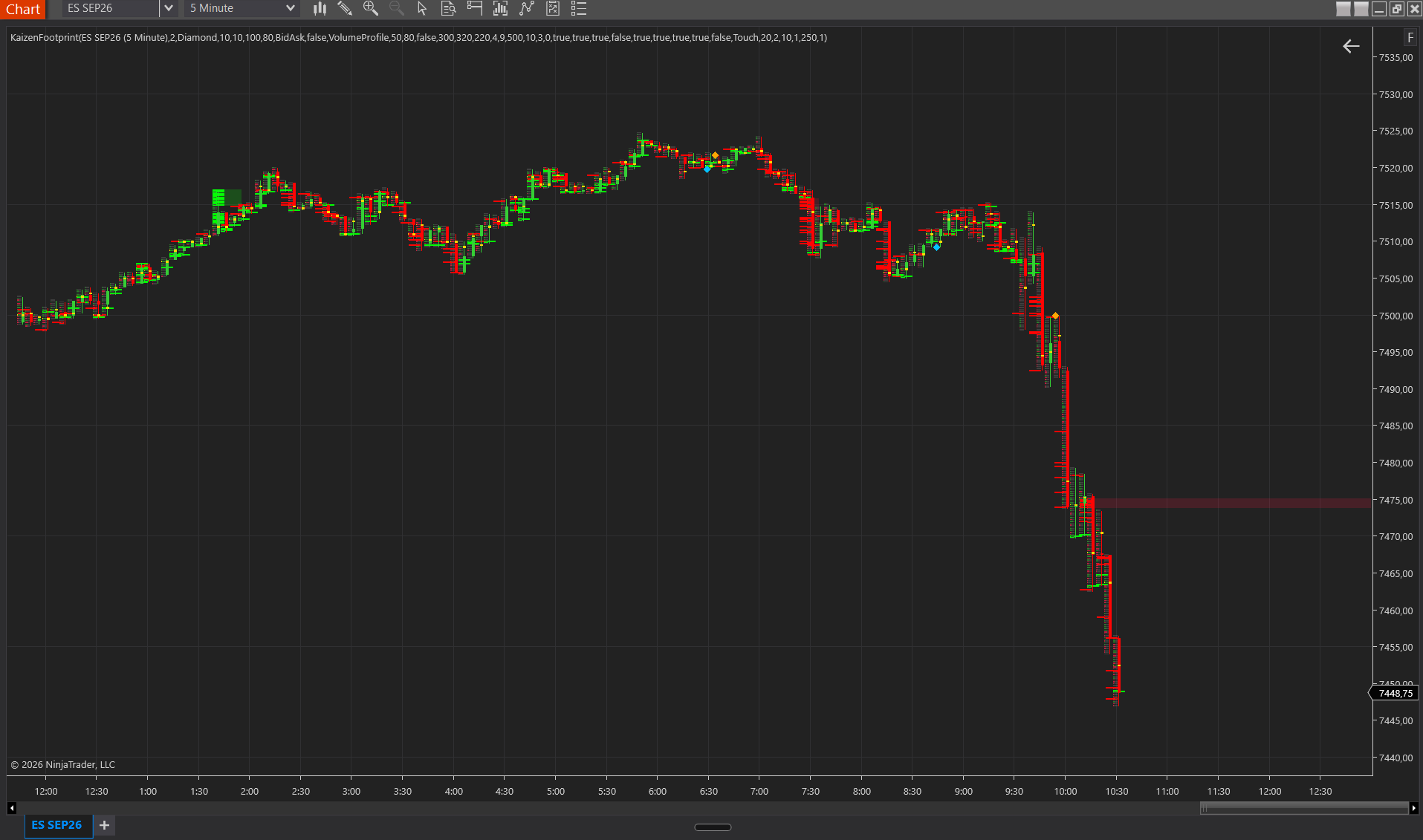
The Kaizen Footprint is our flagship indicator and the tool we have spent the most development time on. It is a full bid x ask footprint chart overlay for NinjaTrader 8 with 22 configurable settings.
Three display modes — BidAsk, Delta, and TotalVolume — let you switch between the classic footprint view, net delta per level, and total volume per level. Cell background shading adjusts by buy/sell dominance, so you can scan the auction at a glance without reading individual numbers.
Diagonal imbalance detection compares ask volume at one level against bid volume at the level below (for bullish imbalances) and bid volume at one level against ask volume at the level above (for bearish imbalances). The imbalance ratio is configurable from 100% to 10,000%, with a minimum delta filter to exclude noise. Imbalances are marked with tick marks on the cell edge, and when three or more consecutive imbalances stack up, the indicator projects a stacked imbalance zone — a shaded rectangle that acts as a support or resistance area until price invalidates it.
Unfinished business lines project horizontally from levels where the auction is incomplete (volume traded on both sides at a candle’s extreme). When price later completes the auction at that level, the indicator marks it as finished business. These lines give you high-probability mean reversion targets.
Additional features include POC highlighting with a gold border on the highest-volume level of each bar, a thin candle body strip on the right edge for price action context, a bar summary row showing total volume and delta, auto-scaling font sizes that adjust to your zoom level, and a volume divisor for readability on high-volume instruments.
The Magnifier feature lets you inspect any bar’s footprint data without expanding the candle — assign a keyboard shortcut (e.g., Ctrl+M) to open a magnifier window that shows the full footprint detail for the bar under your cursor. This is especially useful on higher timeframes or zoomed-out charts where the footprint cells are too small to read directly.
At $249, the Kaizen Footprint is a one-time lifetime license — no subscription, no renewal fees.
Other Options
NinjaTrader Order Flow+ (included with a NinjaTrader Lifetime license). NinjaTrader offers volumetric bars through its own Order Flow+ suite, which shows volume per level in a footprint-style display. Per NinjaTrader’s documentation, Order Flow+ studies are included for all NinjaTrader Lifetime license holders ($1,499 one-time), and NinjaTrader also unlocks Order Flow+ — together with real-time market data and Market Replay — once you fund a live NinjaTrader brokerage account. If you already hold a Lifetime license or trade a funded NinjaTrader account, you already have volumetric bars at no extra cost, and that is the sensible place to start. What is not part of it: diagonal imbalance detection, stacked zone projection, and unfinished business tracking.
Jigsaw Daytradr. Jigsaw is a well-known order flow platform that works with NinjaTrader (and other platforms). It includes a depth-of-market tool, reconstructed tape, and summary tape in addition to footprint-style charts. It is subscription-based (approximately $379/year or $37/month at time of writing). Jigsaw is a standalone application rather than a native NinjaTrader indicator, which means it runs separately and feeds data through a connection. We have not tested Jigsaw firsthand — this description is based on their published features and pricing.
GoNoGo Footprint. GoNoGo offers a footprint indicator for NinjaTrader that includes delta footprint and volume footprint modes. Their pricing and feature set can be found on their website. We have not tested this product firsthand.
We have not tested these competitor products ourselves. Descriptions are based on their published feature lists and pricing at time of writing. Always verify current pricing and features directly with the vendor.
Kaizen Footprint
flagshipFull bid×ask footprint chart with imbalances, stacked zones & unfinished business
$249
Lifetime license
Volume Profile — Find Where Volume Lives
While footprint charts show you the auction within individual bars, volume profile steps back and shows you where volume accumulated across an entire session, day, or week. The result is a horizontal histogram overlaid on your chart — tall bars at prices where heavy trading occurred, thin bars where price moved quickly with little interest.
Volume profile reveals the market’s agreed-upon value areas and highlights the price levels that institutions care about. For a detailed comparison of volume profile versus its time-based cousin (TPO), see our Volume Profile vs TPO comparison.
What to Look For
Multiple profile modes. At minimum, you want session profiles (one profile per session) and daily profiles. Weekly profiles are valuable for swing traders. A visible window mode — which profiles only the bars currently visible on your chart — is a useful bonus for quick ad-hoc analysis.
POC, VAH, and VAL. The Point of Control (highest volume level), Value Area High, and Value Area Low are the three key reference levels that every volume profile should calculate and display. The value area percentage should be configurable (commonly set between 68% and 70%).
Naked level projection. When a POC, VAH, or VAL from a prior session has not been retested by price, it is considered “naked” — an untested level that often acts as a magnet for future price action. The best volume profile indicators project these naked levels forward as lines until price retests them. Beyond being targets, these levels — especially the VAH and VAL — frequently function as high-probability rebound levels, acting as strong support or resistance where price is likely to bounce upon its first encounter.
Tick vs. minute accuracy. True tick-level accuracy requires NinjaTrader’s Tick Replay feature, which uses more disk space and processing power. Minute-level accuracy is a practical alternative that approximates volume distribution using 1-minute bar data. A good volume profile indicator should support both modes, letting you choose based on your performance requirements.
Visual customization. You will likely run volume profile alongside other indicators (footprint, VWAP, etc.), so opacity controls, width adjustments, and positioning options (left vs. right side of the bar) are essential to keep your chart readable.
Our Pick: Kaizen Volume Profile ($179)
The Kaizen Volume Profile supports four profile modes: Session, Daily, Weekly, and Visible Window. Each mode generates volume-at-price histograms with POC, Value Area High, and Value Area Low clearly marked and labeled.
Naked level projection is built in — POC, VAH, and VAL lines from prior profiles extend forward as dashed lines until price retests them. These naked levels act as untested support and resistance, and many traders use them as primary entry and exit targets.
The indicator offers two view styles: Ladders (individual bars at each price level) and Area (a filled histogram shape). Ladders give you more precision for reading exact volume at each level; Area gives you a quicker visual scan of the overall distribution shape.
Two accuracy modes — Tick and Minute — let you choose between exact tick-level volume distribution (requires Tick Replay enabled in NinjaTrader) and minute-level approximation (no Tick Replay needed, lower resource usage). Both modes produce reliable profiles, but Tick mode is more precise at fine granularity.
With 14 settings covering profile mode, view style, accuracy, width, opacity, label display, and naked level controls, the Kaizen Volume Profile gives you enough configurability to fit your workflow without overwhelming you with options. Lifetime license, no subscription.
Other Options
NinjaTrader Built-in Volume Profile. NinjaTrader includes a basic volume profile tool. It shows volume at price for the current session but lacks features like naked level projection, multiple view styles, and the flexibility of a dedicated indicator. If you are just exploring volume profile concepts, it is a free way to start.
Rancho Dinero Volume Profile. Rancho Dinero offers a volume profile indicator for NinjaTrader with features including composite profiles and development area analysis. We have not tested this product firsthand — check their website for current pricing and feature details.
IndicatorWarehouse. IndicatorWarehouse sells various NinjaTrader add-ons including volume profile tools. Their product lineup changes over time, so visit their website for the latest offerings. We have not tested their products firsthand.
We have not tested these competitor products ourselves. Descriptions are based on their published feature lists. Always verify current pricing and features directly with the vendor.
Kaizen Volume Profile
professionalVolume-at-price histogram with POC, Value Area & Naked Levels
$179
Lifetime license
CVD — Track Buy vs. Sell Pressure
Cumulative Volume Delta (CVD) is one of the most powerful order flow indicators because it tracks the net “aggression” in the market. It maintains a running total of aggressive buy volume (Market Buys) minus aggressive sell volume (Market Sells) throughout the trading session. When CVD is rising, aggressive buyers are driving the market; when it is falling, aggressive sellers dominate. The true edge of CVD lies in divergence analysis: if price makes a new high but CVD does not, it signals that aggressive buyers are being absorbed by passive limit sellers — an early warning that the current move is running out of steam. If you are new to the metric, what delta is in trading covers the basics, and our delta divergence guide walks through the divergence patterns.
What to Look For
Session reset. CVD should reset to zero at the start of each trading session. Without a session reset, the cumulative total carries over from previous days and the absolute number becomes meaningless. What matters is the direction and shape of the CVD line within the current session.
Candle vs. line display. Some traders prefer CVD displayed as candles (showing OHLC of cumulative delta per bar), while others prefer a simple line. Candle mode gives you more information — you can see whether delta expanded or contracted within each bar — but line mode is cleaner and easier to read for divergence analysis. The best CVD indicators offer both.
Accuracy of bid/ask classification. Just like footprint charts, CVD quality depends entirely on how accurately trades are classified as buys or sells. Tick-level classification from actual bid/ask data is essential. Any CVD tool using estimated or approximated delta will produce unreliable divergence signals.
Our Pick: Kaizen CVD ($99)
The Kaizen CVD displays as a separate panel below your price chart, tracking the net aggression by calculating the running sum of market buy orders minus market sell orders from tick data. It resets at the start of each session, providing a clear daily view of the battle between aggressive market participants and passive limit orders. This allows you to see whether the current price action is backed by real conviction or if the move is lacking aggressive participation.
Two visual modes — Candles and Line — let you choose your preferred display. In Candle mode, each bar shows OHLC of cumulative delta, so you can see intra-bar delta development. In Line mode, you get a clean running total that is ideal for spotting divergences against price.
A zero line provides a clear reference point — above zero means net buying since the session open, below zero means net selling. Numeric CVD labels on the chart show the exact running total.
With only 4 settings (visual mode, zero line toggle, label toggle, and opacity), the Kaizen CVD is deliberately simple. CVD does not need 20 settings — it needs accurate data and a clean display. That is exactly what this tool provides, and at $99 for a lifetime license, it is one of the most accessible entry points into order flow trading.
Other Options
NinjaTrader Order Flow Cumulative Delta (part of Order Flow+). NinjaTrader includes a cumulative delta indicator in its Order Flow+ suite, which comes with a NinjaTrader Lifetime license and is also unlocked by funding a live NinjaTrader brokerage account. It provides solid CVD functionality with candle display and covers the fundamentals well; a dedicated tool mainly adds configurability. If you already have access, start there.
Community indicators. The NinjaTrader forums host a variety of free community-built CVD indicators. Quality and maintenance vary significantly. Some are well-built by experienced developers; others are simple scripts that may not handle edge cases (session boundaries, overnight data, instrument changes) correctly. Community tools are worth exploring if you are on a tight budget, but be prepared to test thoroughly before trusting them with real trading decisions.
Kaizen CVD
essentialCumulative Volume Delta as candles or line — read buy/sell pressure
$99
Lifetime license
Delta Bars and Absorption — Read the Fight at Every Bar
While CVD shows the cumulative picture, per-bar delta analysis reveals the immediate aggression within each individual candle. This indicator specifically tracks market orders, representing the activity of aggressive market participants who cross the spread to execute trades. Delta bars open at zero and close at the bar’s net delta (market buys minus market sells), giving you a clear visual representation of which side — the aggressive buyers or aggressive sellers — won the battle for that specific candle.
The real edge comes from absorption detection. Absorption occurs when one side is aggressively trading (large delta) but price fails to move in that direction — meaning the other side is passively absorbing the aggression. This is one of the most reliable order flow signals in trading: it tells you that a large player is standing firm against the crowd. Our absorption guide shows how to spot it on a footprint and a delta panel.
Our Pick: Kaizen Delta Candle ($99)
The Kaizen Delta Candle displays in a separate panel as delta candles that open at 0 and close at the bar’s net delta. Green candles indicate net buying (positive delta), red candles indicate net selling (negative delta).
The standout feature is built-in absorption detection with two signal levels:
- Strong absorption: Delta exceeds the configurable threshold but price moves in the opposite direction. These are marked with arrow signals — a strong indication that a large passive player is absorbing aggressive orders. Strong absorption at key support or resistance levels is one of the highest-conviction order flow signals you can get.
- Weak absorption: Delta diverges from price direction but does not exceed the strong threshold. These are marked with smaller dot signals — an early warning that the current move may be losing conviction.
Threshold reference lines on the delta panel provide visual context for how strong the current bar’s delta is relative to your absorption threshold.
With 4 settings (candle opacity, absorption arrow toggle, weak absorption toggle, and absorption threshold), the Kaizen Delta Candle keeps things focused on what matters: bar delta and absorption detection. $99, lifetime license.
Kaizen Delta Candle
essentialPer-bar delta candles with absorption detection signals
$99
Lifetime license
VWAP — Institutional Fair Value
The Volume Weighted Average Price (VWAP) is the single most-watched intraday reference level among institutional traders. It represents the average price weighted by volume for the current session — effectively, the “fair value” of the instrument based on where most volume has traded.
Institutional algorithms benchmark their execution against VWAP. When price is above VWAP, the average buyer is in profit. When price is below, the average seller is winning. Standard deviation bands around VWAP create dynamic overbought and oversold levels that adapt to the day’s volatility. For the calculation and the bands explained step by step, see what VWAP is; for setups built on it, see how to use VWAP.
What to Look For
Directional coloring. A VWAP line that changes color based on its direction (rising vs. falling) gives you an instant visual cue about the session trend. Green rising VWAP means the fair value is moving up — bullish. Red falling VWAP means fair value is declining — bearish.
Standard deviation bands. At minimum, you want 1 SD band above and below VWAP. Advanced tools offer 2 or 3 SD bands with configurable multipliers. These bands create a statistical framework — price reaching the 2nd or 3rd SD band is statistically extended and likely to revert.
Cloud fills. Shaded regions between SD bands improve visual clarity. You can see at a glance whether price is in the value area (between 1 SD bands), extended (between 1 and 2 SD bands), or at an extreme (beyond 2 SD bands).
Prior session VWAP. Yesterday’s closing VWAP level often acts as support or resistance during the current session. The indicator should display prior session VWAP as a separate reference level.
Multiple plot outputs. If you use VWAP levels in NinjaTrader Market Analyzer, strategy builder, or other indicators, the VWAP indicator should expose its values as separate plot outputs (VWAP, Upper1, Lower1, Upper2, Lower2, etc.).
Our Pick: Kaizen VWAP ($99)
The Kaizen VWAP covers all the bases with a clean implementation that overlays directly on your price chart.
Directional coloring switches the VWAP line between green (rising) and red (falling), giving you an instant read on the session trend direction. You can also run it in solid mode if you prefer a neutral single-color line.
Three configurable SD bands (upper and lower) with individual multipliers create six additional reference levels around VWAP. Default multipliers are set at 1.28, 2.01, and 2.51 — statistically meaningful levels — but you can adjust them to match your preferred settings. Cloud fills between the bands create shaded zones that make it easy to see where price sits relative to the VWAP distribution.
Prior session VWAP is displayed as cross markers, giving you a clear reference to yesterday’s closing fair value level. This is one of the most underappreciated VWAP features — prior session VWAP frequently acts as support or resistance during the current day.
The indicator provides 8 plot outputs (VWAP, Upper1/Lower1, Upper2/Lower2, Upper3/Lower3, PriorVWAP) for use in Market Analyzer, strategies, or other indicators. Multiple band line styles (Solid, Dash, Dot, DashDot) give you visual control over how the bands appear on your chart.
11 settings, $99 lifetime license.
Other Options
NinjaTrader Built-in VWAP (free). NinjaTrader includes a basic VWAP indicator. It draws the VWAP line for the current session. It lacks directional coloring, cloud fills, and prior session VWAP — but if you just need a simple VWAP reference line, it works and costs nothing.
SpacyTrader VWAP. SpacyTrader offers VWAP indicators for NinjaTrader with various band options. Check their website for current features and pricing. We have not tested this product firsthand.
We have not tested these competitor products ourselves. Descriptions are based on their published feature lists.
Kaizen VWAP
essentialSession VWAP with directional coloring, 3 SD bands & cloud fills
$99
Lifetime license
Market Profile (TPO) — Time-Based Auction Analysis
Market Profile — also known as TPO (Time Price Opportunity) — takes a fundamentally different approach from volume profile. Instead of measuring how much was traded at each price, it measures how long price stayed at each level. The result is a histogram where each block represents one time period (typically 30 minutes) during which a price level was touched.
Market Profile was developed at the Chicago Board of Trade in the 1980s and remains one of the most respected tools for understanding market structure. The core concepts — Initial Balance, Value Area, Point of Control, single prints — provide a framework for understanding whether the market is in balance (range-bound) or imbalance (trending). Our TPO chart guide explains how to read the letters, and point of control and value area explained covers the levels themselves.
Our Pick: Kaizen TPO ($179)
The Kaizen TPO brings Market Profile to NinjaTrader 8 with three profile modes — Session, Daily, and Weekly — and full clock-aligned sub-period calculation.
Clock-aligned sub-periods mean that 30-minute TPO blocks always start at :00 and :30, regardless of when you loaded the chart. This is critical for Market Profile analysis because the lettering system (A period, B period, etc.) needs to be consistent across all charts and traders. You configure the sub-period length from 1 to 240 minutes.
POC and Value Area (VAH/VAL) are calculated based on TPO count — the price level with the most time periods touching it is the POC, and the Value Area encompasses the configurable percentage (default 70%) of TPO blocks around the POC. This time-based approach to value area often produces different levels than volume profile, which is why many traders use both tools together.
Single print detection identifies interior price levels that were only touched during one sub-period — levels where price moved through quickly without spending time. These single prints often act as magnets for future price action, and the Kaizen TPO projects them forward as dashed lines until price retests them. Think of single prints as the TPO equivalent of volume profile’s low-volume nodes.
13 settings covering profile mode, sub-period length, ticks per row, value area percentage, display options, and block width/opacity. $179 lifetime license.
Other Options
NinjaTrader Built-in Market Profile (part of Order Flow+). NinjaTrader’s Market Profile tool is part of the Order Flow+ suite, included with a NinjaTrader Lifetime license and also unlocked by funding a live NinjaTrader brokerage account. It shows TPO letters for the current session and is a genuinely good way to learn the concept. Single print detection, projection lines and deeper customization are where a dedicated Market Profile tool adds value for daily practitioners.
CBOT Market Profile concept. Market Profile itself is a concept (developed by J. Peter Steidlmayer at the CBOT), not a proprietary product. The theory is freely available in books and educational materials. The indicator is what makes it practical to use on a live chart — and the quality of the implementation (clock alignment, single print detection, projection accuracy) determines whether the tool is genuinely useful or just a visual gimmick.
Kaizen TPO
professionalMarket Profile with time-based price distribution & single print detection
$179
Lifetime license
Large Trade Detection — Spot the Big Players
Large trade detection indicators aggregate tick-level data to identify unusually large aggressive orders in the market. When a 500-lot order hits the ES bid (roughly $1.5M notional), that is institutional activity — and if you can see it in real time on your chart, you have information that most retail traders miss entirely.
The challenge is filtering. Thousands of trades happen every minute in liquid futures markets. A raw stream of trade data is noise. A good large trade indicator aggregates same-price, same-direction trades within a short time window (catching iceberg orders that execute in rapid bursts), classifies them as buy or sell, and displays only the ones that exceed a meaningful size threshold.
Our Pick: Kaizen Big Trades ($179)
The Kaizen Big Trades solves the filtering problem with two approaches:
Tick aggregation groups same-price, same-side trades within a configurable time window (default 30ms). This catches iceberg orders — large institutional orders that execute as rapid bursts of smaller trades to avoid showing on the order book. Without aggregation, a 1,000-lot iceberg order would appear as twenty 50-lot trades. With aggregation, you see a single 1,000-lot marker.
Auto-filter mode calibrates the volume threshold automatically based on a lookback period. You set a target number of signals per day (default 10), and the indicator analyzes the past N days of data to find the volume threshold that would produce approximately that many signals. This means the filter adapts automatically to different instruments and market conditions. Manual mode is also available if you prefer to set exact thresholds.
Trades are classified three ways: Buy (executed at the ask), Sell (executed at the bid), and Between (executed between bid and ask). Each category gets its own color. Markers are sized proportionally to the trade volume using linear or logarithmic scaling — so a 2,000-lot trade appears larger than a 500-lot trade at a glance. Four marker shapes (Circle, Rectangle, Triangle, Diamond) and optional volume labels give you further customization.
13 settings, $179 lifetime license.
Kaizen Big Trades
professionalSpot large aggressive orders with size-proportional markers
$179
Lifetime license
Supporting Tools — Stacked Imbalance, Cluster Search, StatGrid
The core order flow categories above cover the primary tools that most traders need. But there are several supporting indicators that complement them and add depth to your analysis.
Stacked Imbalance ($179)
The Kaizen Stacked Imbalance is a dedicated version of the imbalance detection built into the Footprint indicator. If you want stacked imbalance zones without the full footprint chart overlay — for example, on a chart where you are running volume profile and do not want the visual complexity of a footprint — this standalone indicator detects diagonal bid/ask imbalances and projects stacked zones as support/resistance rectangles. It includes 11 settings for imbalance ratio, minimum stack size, volume filter, zone termination conditions (Touch or Close), and visual customization. Zones remain on the chart until price invalidates them, giving you persistent order flow-derived support and resistance levels.
Cluster Search ($179)
The Kaizen Cluster Search finds significant volume clusters at the tick level and projects untested levels as dashed lines until price retests them. Two search modes give you flexibility: VolumeMax finds the single highest-volume level per bar (useful for identifying the most contested price on each candle), while RelativeCluster finds multiple levels within each bar that exceed a volume multiplier threshold relative to the bar’s average (useful for finding all significant levels, not just the peak). Three marker shapes (Box, Diamond, WideLine) highlight clusters directly on the chart, and untested levels extend as dashed horizontal lines — giving you order flow-derived support and resistance that updates in real time. 10 settings, $179 lifetime license.
StatGrid ($99)
The Kaizen StatGrid displays a color-coded statistics grid in a sub-panel with up to 14 order flow metrics per bar: Trades, Volume, Buy Volume, Sell Volume, Delta, Delta %, Absolute Delta Average, Delta Cumulative, Min/Max Delta, Delta Change, Delta Rate, Volume/Sec, and Duration. Cell background color intensity scales with relative value magnitude across visible bars — creating an instant heatmap of order flow activity. You can toggle individual stat rows on or off and configure the color scale to match your visual preferences. StatGrid is the at-a-glance dashboard that tells you everything about each bar’s order flow without needing to read a footprint. 30 settings (mostly per-stat toggles and color options), $99 lifetime license.
Other Supporting Tools
The Kaizen lineup also includes several tools that complement order flow analysis without being strictly “order flow” indicators:
- Speed of Tape ($99) — Transaction velocity histogram that measures how quickly volume, ticks, or delta accumulates over a rolling time window. Highlights high-velocity events with signal lines on the price chart. Useful for confirming breakouts and detecting institutional activity.
- Naked Levels ($99) — Tracks untested session, daily, and weekly highs and lows as projected lines until price retests them. A clean, automated way to keep key structural levels on your chart.
- Reversal ($99) — Swing reversal detection with ATR scaling and optional CVD delta confirmation. Arrow signals for strong reversals, dot signals for weak ones.
- SuperTrend ($99) — ATR-based trend-following trailing stop with directional coloring. Useful as a trend filter when combined with order flow entry tools.
- Supply Demand ($99) — Automatic supply/demand zone detection with multi-timeframe support. Combines well with order flow tools for confluence.
- Order Info ($99) — Live stop/target info boxes showing tick distance, currency value, account %, and R:R ratio directly on the chart.
The drawing tools — Anchored Volume Profile ($99) and Anchored TPO ($99) — let you manually place volume profile or TPO analysis on any custom range by clicking two anchor points on your chart. Useful for profiling specific events, swing moves, or patterns.
Free NinjaTrader Order Flow Options
Not everyone is ready to invest in premium indicators. Here is what is available for free.
Built-in Order Flow+ (included with a Lifetime license or a funded account)
NinjaTrader ships its own Order Flow+ suite, and for a large share of active NinjaTrader traders it costs nothing extra. Per NinjaTrader’s own documentation, Order Flow+ studies are included for all NinjaTrader Lifetime license users ($1,499 one-time), and NinjaTrader states that funding a live NinjaTrader brokerage account unlocks Order Flow+ — along with real-time market data and Market Replay — on any plan, including the free one. A funded Tradovate account unlocks it as well. There is also a standalone Order Flow+ add-on at $59/month, but that route exists mainly for unfunded or practice accounts: if you intend to fund an account at all, funding is the cheaper path. The most relevant tools in Order Flow+ are:
- Volumetric Bars — A footprint-style display showing volume per level within each candle. It covers the bid x ask view; diagonal imbalance detection, stacked zone projection and unfinished business tracking are not part of it.
- Cumulative Delta — A CVD indicator showing running buy vs. sell volume, and a capable tool for divergence analysis.
If you have access to Order Flow+, start there. It is the cheapest way to find out whether order flow analysis suits how you trade, the data is accurate (it uses NinjaTrader’s tick-level feed), and it covers the fundamentals properly. Dedicated indicators earn their price further along the curve — diagonal imbalance detection, stacked zone projection, unfinished business tracking, magnifier views, and the configurability that daily order flow traders end up wanting. Access terms and pricing can change, so check NinjaTrader’s current pricing page and Order Flow+ documentation before committing to anything.
Community Tools
The NinjaTrader forums host a library of free community-built indicators. You can find volume profile tools, delta indicators, VWAP implementations, and various order flow utilities contributed by community members.
The quality varies enormously. Some community indicators are built by experienced C# developers and work reliably. Others are simple scripts that break on edge cases — overnight sessions, instrument changes, data gaps, or high-volatility conditions. There is no support guarantee, and many community tools are abandoned by their creators after a few months.
Community tools are excellent for learning and experimentation. They let you explore different order flow concepts without spending money. But if you are planning to trade with real capital, you want tools that have been thoroughly tested, actively maintained, and backed by a developer who responds to bug reports. Production trading usually demands more robust tools than what most community projects provide.
Save with Bundles
If you are building a multi-tool order flow workspace, buying individual indicators adds up. That is why we offer four bundles at significant discounts. You can compare all four bundles side by side with every individual indicator price on our pricing page.
Complete Bundle — $599 (save 79%). All 21 tools in the Kaizen lineup. Footprint, Volume Profile, TPO, Stacked Imbalance, Cluster Search, Big Trades, VWAP, CVD, Delta Candle, Order Info, StatGrid, Speed of Tape, Naked Levels, SuperTrend, Reversal, Supply Demand, Delta Profile, Alert Line, Stats Profile, Anchored VP, and Anchored TPO. If you bought each individually, the total would be $2,789. This is the best value by far.
Order Flow Pro — $449 (save 61%). The core order flow toolkit: Footprint, Stacked Imbalance, Cluster Search, Big Trades, CVD, Delta Candle, and Delta Profile. Seven tools covering footprint analysis, imbalance detection, large trade identification, and delta-at-price analysis. Individual total would be $1,163.
Market Profile Pack — $349 (save 58%). Volume Profile, TPO, VWAP, Stats Profile, Anchored Volume Profile, and Anchored TPO. Complete market profile coverage for traders who focus on value area analysis, prior-day level probabilities, and time-at-price concepts. Individual total would be $834.
Essentials Pack — $249 (save 37%). CVD, Delta Candle, VWAP, and Order Info. The four essential tools every trader needs to get started with order flow. Individual total would be $396.
All bundles are one-time purchases — lifetime licenses with no subscription fees.
Bundle & Save
Complete Bundle
All 21 tools at the best price
$599
$2789
Save79%
How to Choose the Right Order Flow Stack
With 21 tools available, the natural question is: which ones do I actually need? The answer depends on your experience level, trading style, and budget, and on the setups you plan to trade. Our order flow trading strategies guide shows which tools each setup actually uses. You can see the full lineup, every price, and all four bundles on the Kaizen pricing page.
Here is our recommendation:
| Level | Recommended Tools | Budget |
|---|---|---|
| Beginner | CVD + VWAP + Delta Candle | ~$297 or Essentials Pack $249 |
| Intermediate | + Volume Profile + Footprint | ~$726 or Order Flow Pro $449 |
| Advanced | Complete Bundle (all 21 tools) | $599 |
Beginner: Start with the Essentials
If you are new to order flow, start with CVD, VWAP, and Delta Candle. These three tools give you the foundation: session fair value (VWAP), cumulative buy/sell pressure (CVD), and per-bar delta with absorption detection (Delta Candle). They run in separate panels below your price chart and do not add visual complexity to the price action itself.
Learn to spot CVD divergences against price. Watch how price reacts at VWAP and the SD bands. Notice when absorption arrows fire at key levels. Once you can read these three tools fluently, you are ready to add complexity.
The Essentials Pack ($249) adds Order Info (live risk/R:R display) to these three core tools and saves you $148 compared to buying individually.
Intermediate: Add Structure Analysis
Once you are comfortable with delta analysis, add Volume Profile and Footprint. Volume profile gives you the structural context — where are the high-volume nodes that act as magnets? Where are the low-volume gaps where price accelerates? Footprint gives you the microscope — what exactly is happening at each price level right now?
The combination of CVD for macro direction, VWAP for fair value, volume profile for structure, and footprint for execution-level detail covers the full spectrum of order flow analysis. Most professional order flow traders use some version of this stack.
The Order Flow Pro bundle ($449) includes the Footprint plus five complementary order flow tools (Stacked Imbalance, Cluster Search, Big Trades, CVD, Delta Candle) — a comprehensive order flow toolkit at 59% off individual pricing.
Advanced: The Full Workspace
If order flow is the core of your trading methodology and you want every tool available, the Complete Bundle ($599) gives you all 21 indicators and drawing tools at 79% off the individual total. This includes the Market Profile tools (Volume Profile, TPO, Stats Profile, Anchored VP, Anchored TPO, VWAP), the full order flow suite (Footprint, Stacked Imbalance, Cluster Search, Big Trades, CVD, Delta Candle, Delta Profile, StatGrid, Speed of Tape), and the supporting tools (Naked Levels, SuperTrend, Reversal, Supply Demand, Order Info, Alert Line).
At $599 for everything versus $2,789 individually, the math is straightforward. If you think you will eventually use 6 or more tools, the Complete Bundle pays for itself.
Frequently Asked Questions
What are the best free NinjaTrader indicators?
NinjaTrader’s built-in Order Flow+ tools (volumetric bars and cumulative delta) are a strong starting point for order flow analysis, and for many traders they cost nothing extra: NinjaTrader includes Order Flow+ studies with its Lifetime license ($1,499 one-time) and also unlocks them when you fund a live NinjaTrader brokerage account. Beyond order flow, NinjaTrader includes hundreds of built-in technical indicators — moving averages, RSI, MACD, Bollinger Bands, and more. The NinjaTrader community forums also have a library of free user-contributed indicators covering everything from volume profile to custom oscillators. These community tools are great for experimentation and learning, though quality and maintenance vary. For production trading, most professionals eventually invest in dedicated tools for reliability and support.
Is NinjaTrader good for order flow trading?
Yes — NinjaTrader is arguably the best platform for order flow trading among retail-accessible options. Three features make it stand out:
C# indicator ecosystem. NinjaTrader indicators are built in C#, a proper programming language. This means developers can build high-performance tools that process tick data efficiently, handle complex rendering, and integrate deeply with the platform. Compare this to platforms where indicators are built in simplified scripting languages with limited access to raw data.
Tick-level data access. NinjaTrader provides direct access to every incoming tick with full bid/ask information. This is the foundation that all accurate order flow analysis depends on. Some platforms aggregate or sample data before it reaches indicators, which makes precise bid/ask classification impossible.
Market Replay. NinjaTrader’s Tick Replay feature lets you replay historical market data at the tick level, which means your order flow indicators can reconstruct accurate historical footprints, profiles, and delta. This is invaluable for backtesting and practice — you can study past sessions with the same precision as live data.
Do I need all order flow indicators?
No. Most traders build their primary edge around 2-4 core tools and add supporting indicators selectively. A CVD + VWAP combination is enough to start making order flow-informed trading decisions. Adding a volume profile gives you structural context. Adding a footprint gives you execution-level detail.
The mistake many traders make is adding too many indicators too quickly. Each tool has its own learning curve, and if you add five order flow indicators to your chart simultaneously, you will spend more time processing information than making trading decisions. Start with 2-3 tools, get fluent with them over several weeks of screen time, and then add more as your analysis demands it.
One-time license vs. subscription — which is better?
For NinjaTrader indicators that run locally on your machine, a one-time license is almost always the better financial decision. Here is the math:
A $99 one-time license costs $99 forever. A $15/month subscription for the same tool costs $180/year and $360 over two years. A $29/month subscription costs $348/year and $696 over two years. The subscription model only makes financial sense if you plan to use the tool for less than a few months.
Subscription pricing has legitimate uses — cloud-based tools with ongoing server costs, real-time data services, or platforms that deliver continuous feature updates. But a NinjaTrader indicator is a DLL file that runs on your computer. Once installed, it does not need a server, a data feed, or ongoing infrastructure. A one-time license reflects the actual cost structure of the product.
All Kaizen Daytrading indicators are sold as one-time lifetime licenses. You pay once, you own it. No recurring charges, no license expiration, no pressure to renew.
Which brokers and data feeds do I need for order flow on NinjaTrader 8?
You need a feed that delivers real-time Level 1 ticks with bid/ask state plus historical bid/ask timestamped ticks for backfill. NinjaTrader Brokerage (Continuum), Tradovate, CQG, Rithmic, Kinetick real-time and IQFeed all qualify. Interactive Brokers and Barchart do not supply historical bid/ask stamped ticks, so footprint bars and BidAsk cumulative delta will not backfill on those feeds — if you execute through IBKR, pair it with a second data connection such as Kinetick real-time or Rithmic. On top of the feed you pay CME exchange fees: $4/month for non-professional Level 1 on a single exchange, $12/month for all four. Full breakdown in what you need to run order flow on NinjaTrader 8.
What is the cheapest way to get footprint charts on NinjaTrader 8?
About $4/month. Run the free NinjaTrader plan, fund a live NinjaTrader Brokerage account (funding unlocks the Order Flow+ suite at no software cost), route natively so no multi-broker add-on applies, and subscribe to CME non-professional Level 1 data for the one exchange you trade. Watch the Free plan’s $35/month inactivity fee if you log into the live environment without placing a trade. If you only want to practice, Market Replay costs nothing and renders footprint and delta natively.
Where can I buy order flow tools for NinjaTrader?
Three routes. NinjaTrader’s own Order Flow+ suite ships with the platform — included with a Lifetime license, unlocked by funding a live account, or available as a $59/month standalone add-on for unfunded accounts. Third-party indicators are sold directly by their developers; the Kaizen tools are on our pricing page and listed in the official NinjaTrader Ecosystem. Free community indicators live on the NinjaTrader forums, with variable quality and no support guarantee.
Is there a free order flow indicator for NinjaTrader 8?
Yes, in two senses. NinjaTrader’s Order Flow+ volumetric bars and cumulative delta cost nothing extra once you fund a live NinjaTrader account, and they are genuinely capable tools. The NinjaTrader forums also host free community-built order flow indicators, though quality and maintenance vary and there is no support behind them. For practice specifically, Market Replay gives you full order flow rendering at zero cost.
Where can I find reliable order flow trade detection tools?
Large-trade detection highlights block orders and split fills above a size threshold you set. NinjaTrader’s Order Flow+ includes a Trade Detector. Among dedicated tools, our Big Trades indicator marks executions by aggressor side with proportional sizing, and Cluster Search scans for volume clusters matching your criteria. Whichever you choose, reliability comes down to the data underneath — tick-level bid/ask data is what makes the trade classification correct in the first place.