Free Session, Opening Range & Initial Balance Indicator for NinjaTrader 8
Session shading, Opening Range and Initial Balance in one free indicator: Asia, London and New York highlighted on the chart, the opening range as a box with mid line and breakout alerts, the initial balance high and low extended through the day. Times default to US Eastern.
Free download. We email you the link. Unsubscribe anytime.
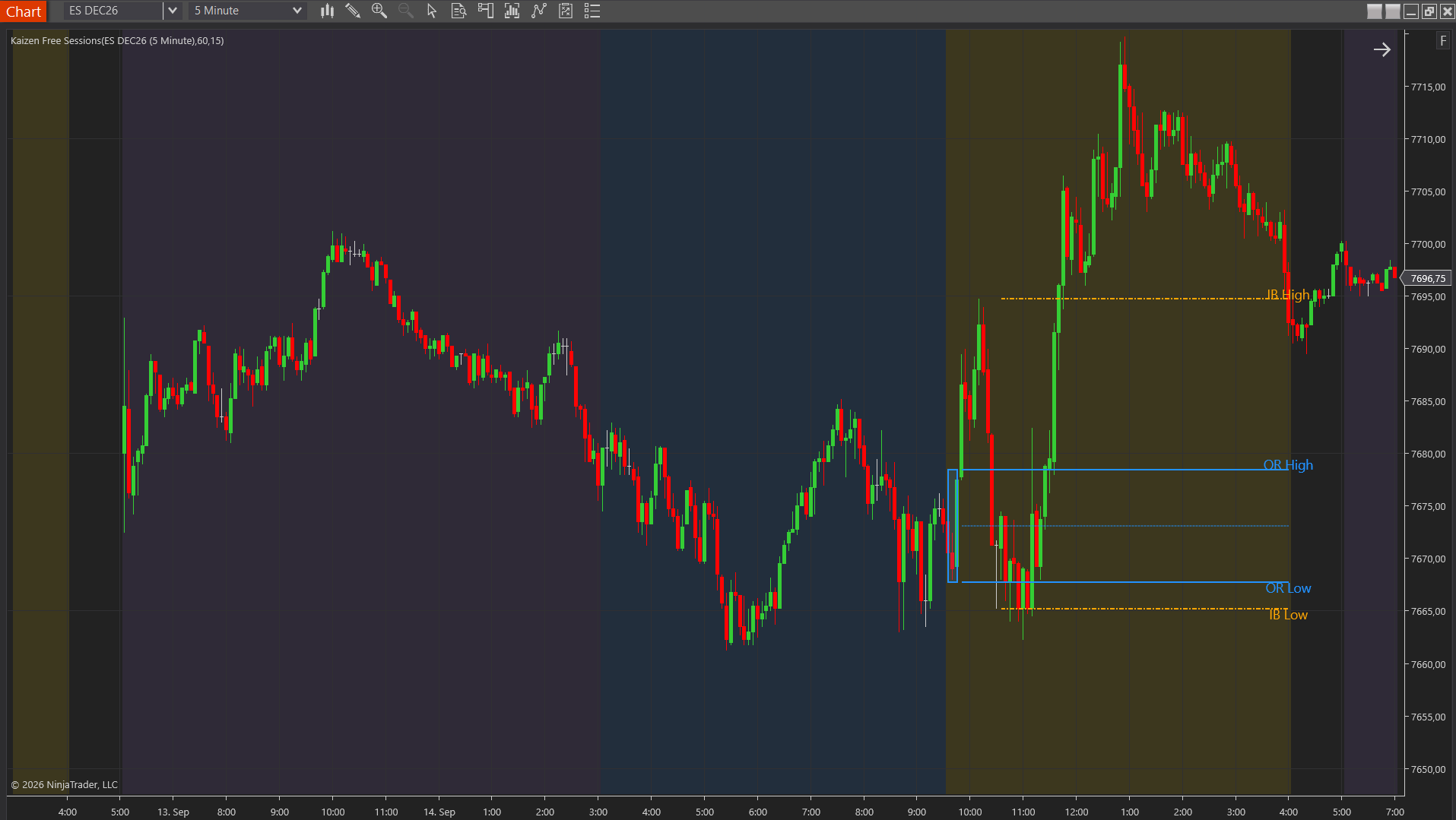
What it does
The chart background is shaded per session. The Opening Range is the high and low of the first N minutes after the RTH open (default 15) as a box with a mid line, then extended as lines to the RTH close. The Initial Balance is the high and low of the first 60 minutes. An optional alert fires on the first close above or below the opening range.
What you get
Settings
Times Are In (Eastern/Chart); per session on/off, start, end, color, opacity; RTH Open (09:30), RTH End (16:00), Opening Range Minutes (15), OR box color/opacity, OR Mid, Alert On OR Breakout, Alert Sound; Initial Balance Minutes (60); Labels.
Good to know
Best on 1- to 5-minute charts. On bars longer than the opening-range window, the first RTH bar counts as the range. Default times are set for US index futures; other markets need their own session times.
How to install
- 1
Download the ZIP and unzip it. Inside you find KaizenFree<Name>_v1.0.0.zip plus a README.
- 2
In NinjaTrader 8: Control Center > Tools > Import > NinjaScript Add-On...
- 3
Select KaizenFree<Name>_v1.0.0.zip (do not unzip this one) and click Open. NinjaTrader compiles the indicator and confirms "Import successful".
- 4
Open a chart, right-click > Indicators..., pick "Kaizen Free <Name>" under Available, Add, OK.
Requirements: NinjaTrader 8.1.x (8.0 compiles too). No license key needed.
Using Initial Balance and sessions? Market profile is the next step.
Initial Balance and sessions are market-profile language. When you want to see how the day is building value around them — and the probabilities of the day extending — TPO, Volume Profile, Anchored VP/TPO and StatsProfile are the natural next step.
More free tools
Free for personal and commercial use, source included, not for resale. See LICENSE.txt in the download.
Futures and CFD trading involves substantial risk of loss and is not suitable for every investor. These tools are provided for educational purposes, "as is", without warranty of any kind, and do not constitute investment advice. Past performance is not indicative of future results.
NinjaTrader® is a registered trademark of NinjaTrader Group, LLC. Kaizen is a listed vendor in the NinjaTrader Ecosystem.