The best NinjaTrader 8 indicators in 2026 are not the ones with the longest feature list. They are the ones that match your data feed, your NinjaTrader plan and the way you actually trade. This guide sorts the market into six categories, lists what NinjaTrader already includes for free, and compares the third-party vendors on the things that decide the purchase: price, license terms, trial or refund policy, and the data each tool needs to run. We sell NinjaTrader 8 indicators ourselves, so every competitor is named and every price carries the date we saw it.
If you only trade order flow, our dedicated guide to the best NinjaTrader order flow indicators goes deeper on footprints, delta and profiles. This page is the wider map.
What NinjaTrader 8 Already Includes
Before buying anything, know what the platform gives you. The free NinjaTrader 8 plan ($0 per month, $0.39 per micro contract side when you trade through NinjaTrader Brokerage) includes the complete standard indicator library, advanced charting, drawing tools, strategy backtesting and a simulation account. That covers moving averages, session VWAP variants, volume, ATR, pivots, Bollinger bands and roughly a hundred more studies. For many traders that is enough for months.
The part people ask about is Order Flow+: volumetric (footprint-style) bars, cumulative delta, a volume profile indicator and drawing tool, order flow VWAP, a market depth map and a trade detector. As of 2026 there are four ways to get it:
- Fund a live NinjaTrader Brokerage account. Funding unlocks Order Flow+ on any plan, including the free one, at no software cost.
- Fund a Tradovate account. Same unlock across desktop, web and mobile.
- Buy the Lifetime license ($1,499 one-time, or four monthly payments of $499). Order Flow+ is included permanently, together with the lowest commission tier ($0.09 per micro side).
- Pay $59 per month for the standalone Order Flow+ add-on if you keep an unfunded account.
Older help pages still say Order Flow+ “requires a Lifetime license.” That was true for years and is no longer the whole story; the funded-account and monthly routes are documented on NinjaTrader’s current pricing and support pages. Our data feed guide walks through the exact cost of each route, including CME data fees.
Two things Order Flow+ does not include: a TPO (market profile) chart, and any of the specialized tools below such as stacked imbalance zones, big trade detection or supply and demand zones. That gap is where the third-party market lives.
How We Compared
Every vendor in this guide was checked on Sep. 17, 2026 for five things: the price as shown on its own site that day, the license model (lifetime, subscription, per machine or per user), the trial or refund policy, the data the tool needs (Level 1 tick data with bid/ask state, or Level 2 market depth), and whether it runs on the free NinjaTrader plan. We did not rank vendors by trading results, because no indicator produces results by itself and any claim to the contrary is marketing.
Two vendors are included even though they are not NinjaScript indicators: Bookmap and Jigsaw daytradr are separate applications that connect to NinjaTrader 8. They compete for the same budget as an indicator package, so they belong in the comparison, but they are a different kind of purchase.
Category 1: Order Flow and Footprint Charts
A footprint shows the volume traded at the bid and at the ask for every price inside a bar. It is the tool most traders mean when they say “order flow,” and it is where the price spread between vendors is widest.
| Product | Price (seen Sep. 17, 2026) | Trial / refund | Data needed | Free NT8 plan? |
|---|---|---|---|---|
| NinjaTrader Order Flow+ Volumetric Bars | Included with funded live account or Lifetime; else $59/mo | 14-day live data trial at signup | Level 1 bid/ask ticks | Yes, once funded |
| Kaizen Footprint | $249 lifetime | 30-day money-back, no trial | Level 1 bid/ask ticks | Yes |
| MZpack mzFootprint | From €149 lifetime single; all 6 indicators €399 lifetime or €49/mo | 14-day full trial, no card | Level 1 tick data | Yes (vendor states any NT8 license) |
| SidiFootprint (TwinPeaks) | €18.90/mo or €399 lifetime, plus VAT | 14-day demo | Tick-level bid/ask | Not stated |
| Affordable Indicators Impact Order Flow | $995 list; $795 sale seen (1 PC), $1,275 (2 PCs) | All sales final, no trial | Tick-by-tick data | Yes (vendor states) |
| OrderFlowLabs OFL for NinjaTrader | $199 first month then $249/mo, or $299 first quarter then $659/quarter | Free tier with 12 studies; paid refund not stated | Not stated | Not stated |
| ninZa Order Flow Presentation v2 | From $450 (vendor site) | No refunds, 30-day exchange | Not stated | Not stated |
| BestOrderFlow Pack 1 | Subscription; combo pricing shown at checkout | 30-day subscription usable as trial; all sales final | Pack 1 Level 1, Packs 2-3 Level 2 | Not stated |
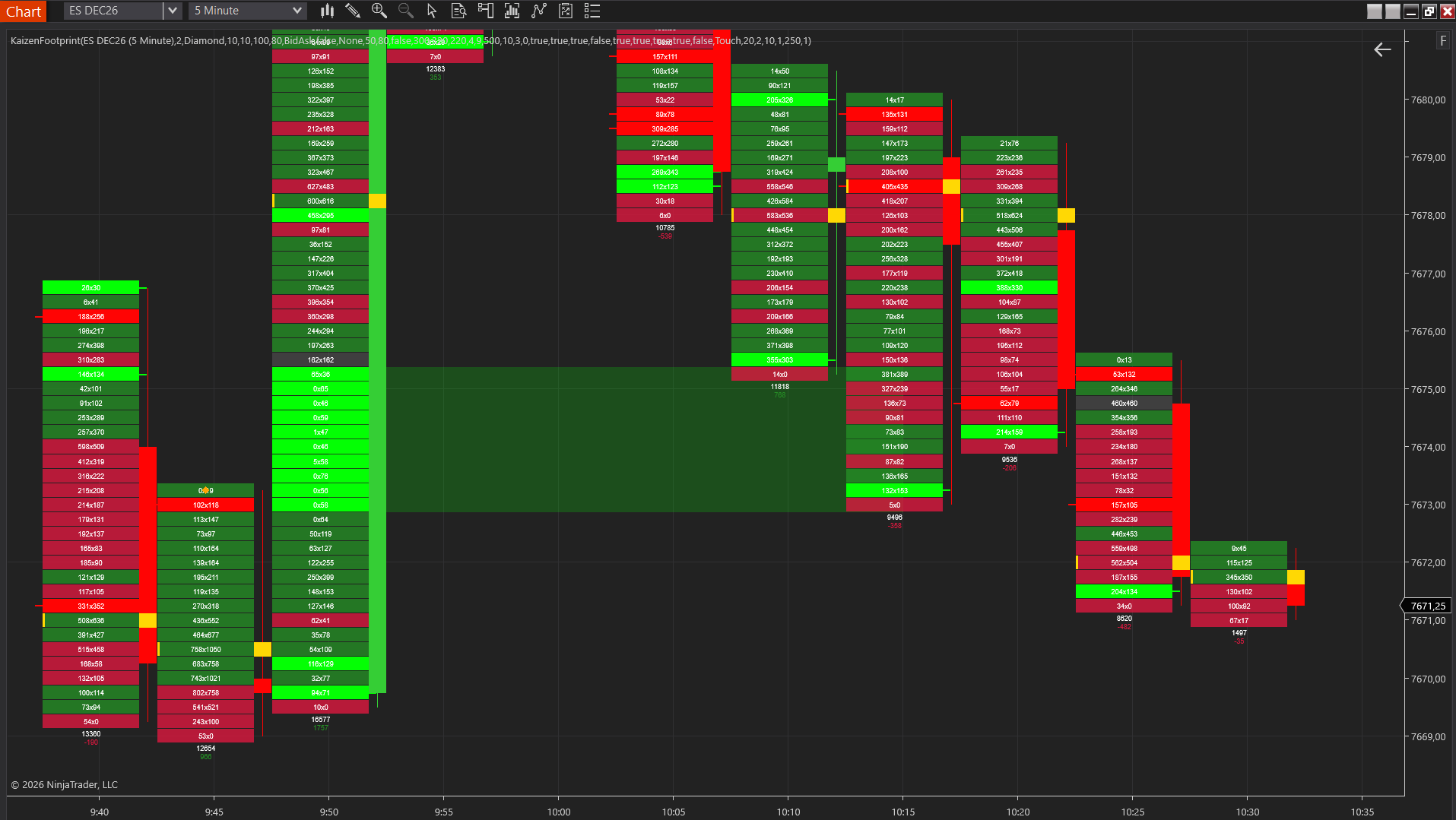
How to read this table. The cheapest complete route is a funded NinjaTrader account plus the built-in volumetric bars. The reason traders still buy third-party footprints is the analysis layer on top: diagonal imbalance detection, stacked zones projected as support and resistance, unfinished auction markers, absorption flags. If those features are the reason you are shopping, compare them feature by feature rather than by price alone; our footprint chart guide explains what each one measures.
MZpack and Sidi are the two vendors that let you try before paying, which matters for a tool as visual as a footprint. Affordable Indicators sits at the top of the price range with a strict no-refund policy, so its pages and videos are the only preview you get. OrderFlowLabs is the one subscription-first vendor; note that the $299 headline price covers the first quarter and renews at $659, so a year costs roughly $2,300 on the quarterly plan.
Kaizen Footprint
flagshipFull bid×ask footprint chart with imbalances, stacked zones & unfinished business
$249
Lifetime license
Category 2: Volume Profile and TPO (Market Profile)
Volume profile shows how much traded at each price over a session, day, week or custom range; TPO charts show how much time price spent at each level. Traders use both to find the point of control, the value area and untested levels. The two are often confused; our volume profile vs. market profile comparison explains when each one is the right tool.
| Product | Price (seen Sep. 17, 2026) | Trial / refund | Notes |
|---|---|---|---|
| NinjaTrader Order Flow Volume Profile | Part of Order Flow+ (see above) | Same as Order Flow+ | Volume profile only; no TPO chart in Order Flow+ |
| Kaizen Volume Profile | $179 lifetime | 30-day money-back | Session, composite, daily, weekly, visible-window and custom-range modes, POC, value area, naked levels |
| Kaizen TPO | $179 lifetime | 30-day money-back | Dalton-style TPO columns, single prints, value area |
| Kaizen Anchored Volume Profile and Anchored TPO | $99 lifetime each | 30-day money-back | Drawing tools: profile between two anchors you place |
| MZpack mzVolumeProfile | In the €399 lifetime / €49 per month package | 14-day full trial | Session, composite, stacked and custom profiles, TPO, VWAP and naked levels in one indicator |
| SidiVolumeLevels (TwinPeaks) | €349 lifetime plus VAT | Demo available; length not stated | Volume-based levels |
| ninZa Market Profile (Flexible) v2 and Flex TPO | $250 and $275 (vendor site) | No refunds, 30-day exchange | Two separate products |
| BestOrderFlow Range Profile | Included in Pack 1 subscription | 30-day subscription as trial | Level 1 |
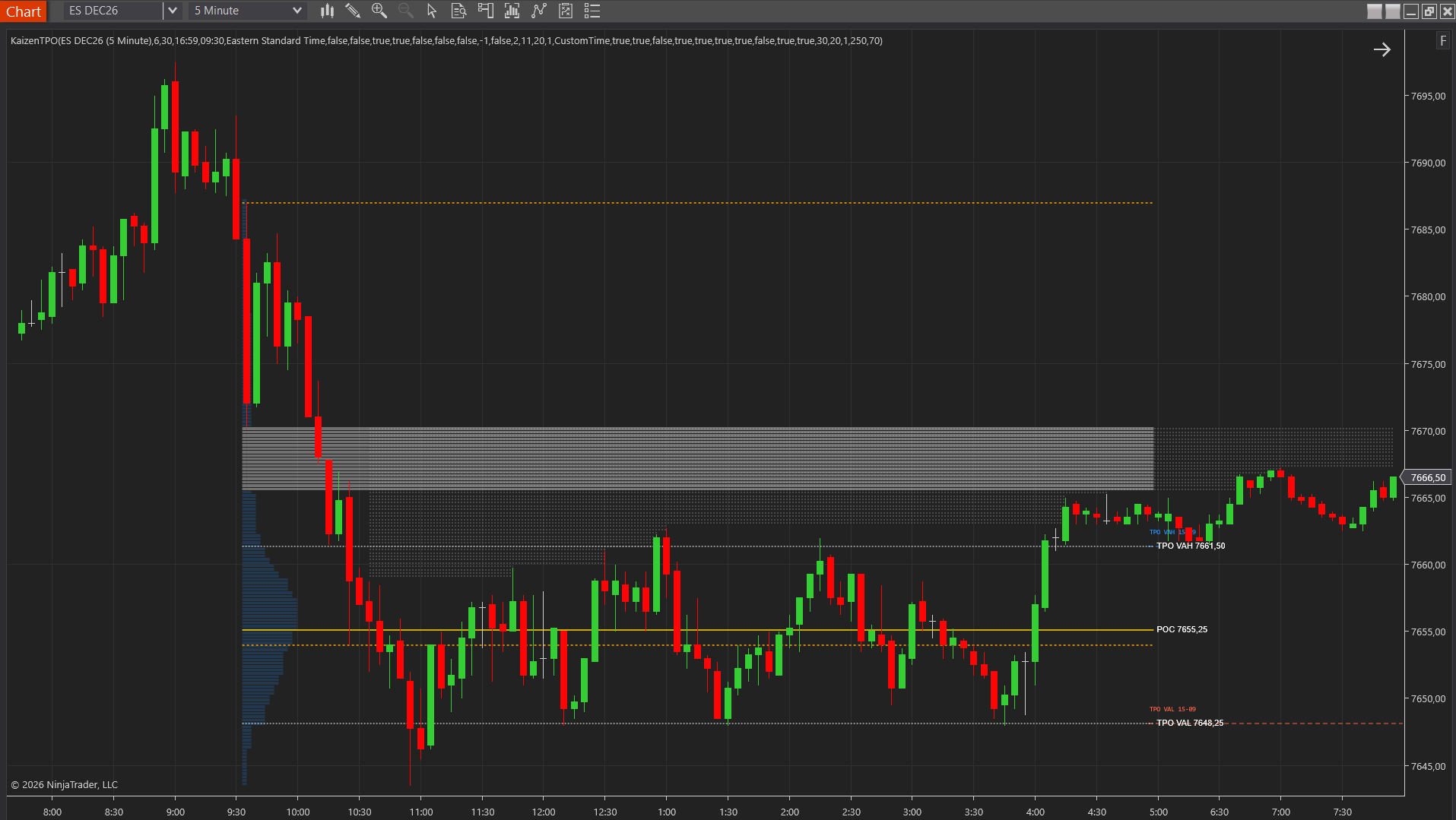
The practical difference between the vendors here is scope. MZpack folds profile, TPO, VWAP and naked levels into one indicator; Kaizen sells them as separate tools at $99 to $179 each and bundles them; ninZa and Sidi sell single-purpose products. If you want a fixed session profile with a value area, any of them will do it. If you want to anchor a profile to a swing or a news candle, look for a dedicated anchored drawing tool, which not every vendor offers.
Category 3: VWAP and Session Tools
VWAP is built into NinjaTrader 8 in its basic form, and the Order Flow+ version adds standard deviation bands. The third-party market competes on anchoring, band logic and session handling.
| Product | Price (seen Sep. 17, 2026) | Trial / refund | Notes |
|---|---|---|---|
| NinjaTrader standard VWAP | Free plan | n/a | Session VWAP without bands |
| NinjaTrader Order Flow VWAP | Part of Order Flow+ | Same as Order Flow+ | Adds SD bands |
| Kaizen VWAP | $99 lifetime | 30-day money-back | Session VWAP with three SD bands, directional coloring and cloud fills |
| OrderFlowLabs Anchored VWAP / TWAP | Free (OFL Freemium, 12 studies, no card) | n/a | The strongest free anchored VWAP from a commercial vendor |
| ninZa Flex VWAP and VWAP Flux | $275 and $300 (vendor site) | No refunds, 30-day exchange | Two products |
| Dynamic Swing Anchored VWAP (User App Share) | Free | n/a | Community script, created Oct. 2025, anchors to swing pivots |
| Kaizen Sessions and Opening Range | Free, open source | n/a | Session boxes, opening range and initial balance; not a VWAP, but the session tool most VWAP traders pair with it |
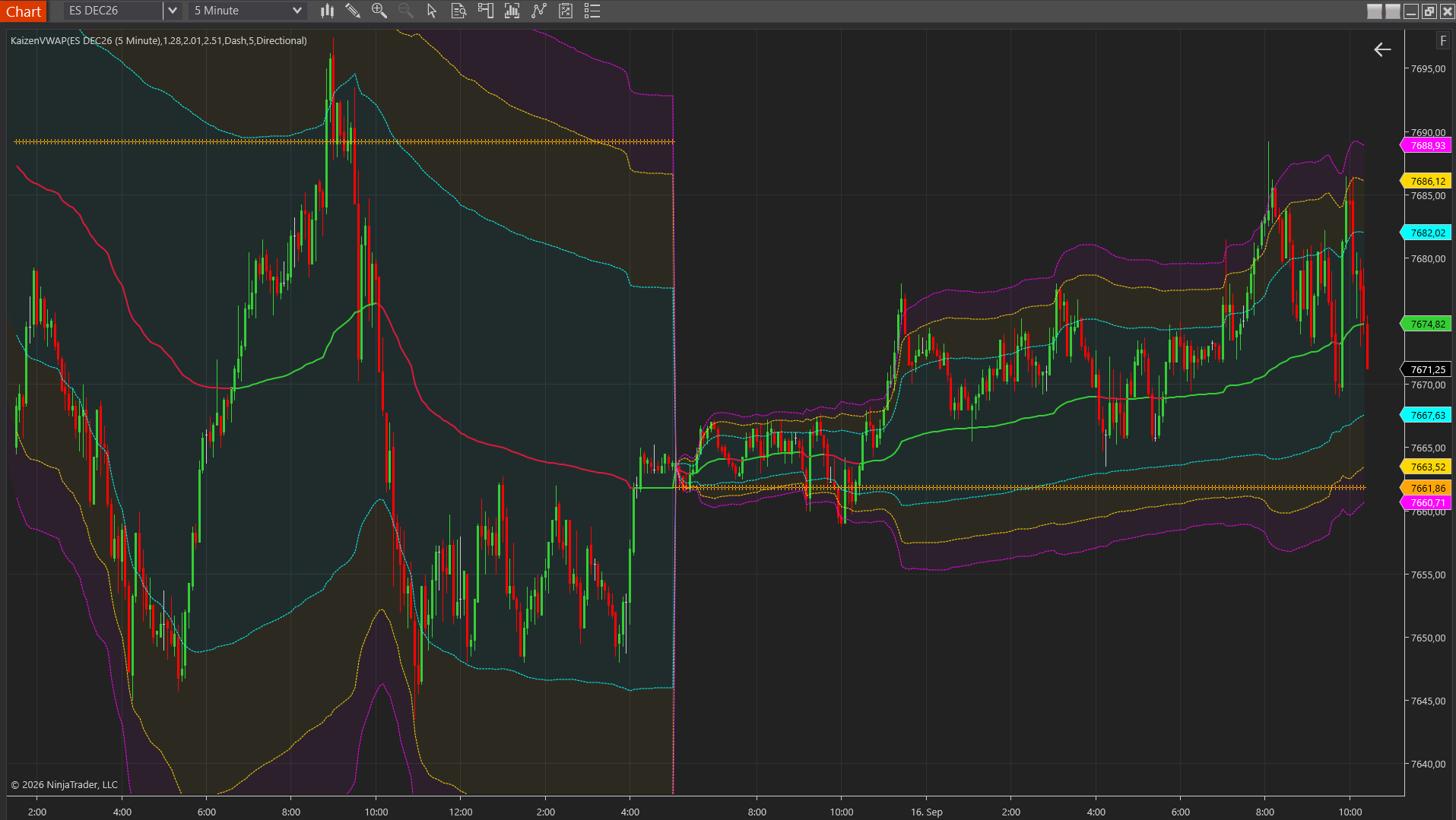
For most traders this category is not worth a large purchase. Start with the built-in VWAP, add the free OrderFlowLabs anchored version if you need anchoring, and buy a paid VWAP only when a specific feature such as band cloud fills or multi-session handling is missing. Our guide on how to use VWAP covers the setups that actually need the extras.
Category 4: Delta and Cumulative Volume Delta
Delta is the difference between volume traded at the ask and at the bid; cumulative delta (CVD) runs that total across the session. This is the category with the most free options, because the calculation is simple once you have bid/ask ticks.
| Product | Price (seen Sep. 17, 2026) | Trial / refund | Notes |
|---|---|---|---|
| NinjaTrader Order Flow Cumulative Delta | Part of Order Flow+ | Same as Order Flow+ | Line or candle CVD |
| Kaizen CVD | $99 lifetime | 30-day money-back | CVD as OHLC candles or line, session reset |
| Kaizen Delta Candle | $99 lifetime | 30-day money-back | Per-bar delta candles with absorption flags |
| Kaizen Delta Profile | $179 lifetime | 30-day money-back | Delta by price level, session, composite and swing modes |
| MZpack mzVolumeDelta and mzDeltaDivergence | In the €399 lifetime / €49 per month package | 14-day full trial | Level 1 tick data |
| OrderFlowLabs Delta Towers and Delta Dominance | Free (OFL Freemium) | n/a | Delta Map is in the paid tier |
| Delta Volume (User App Share) | Free | n/a | Community script from 2022, 4,000+ downloads, bid/ask based, optional CVD and divergences |
| LegToLegDeltaProfile (User App Share) | Free | n/a | Community script from Jan. 2026, delta by price with its own 1-tick series, Tick Replay compatible |
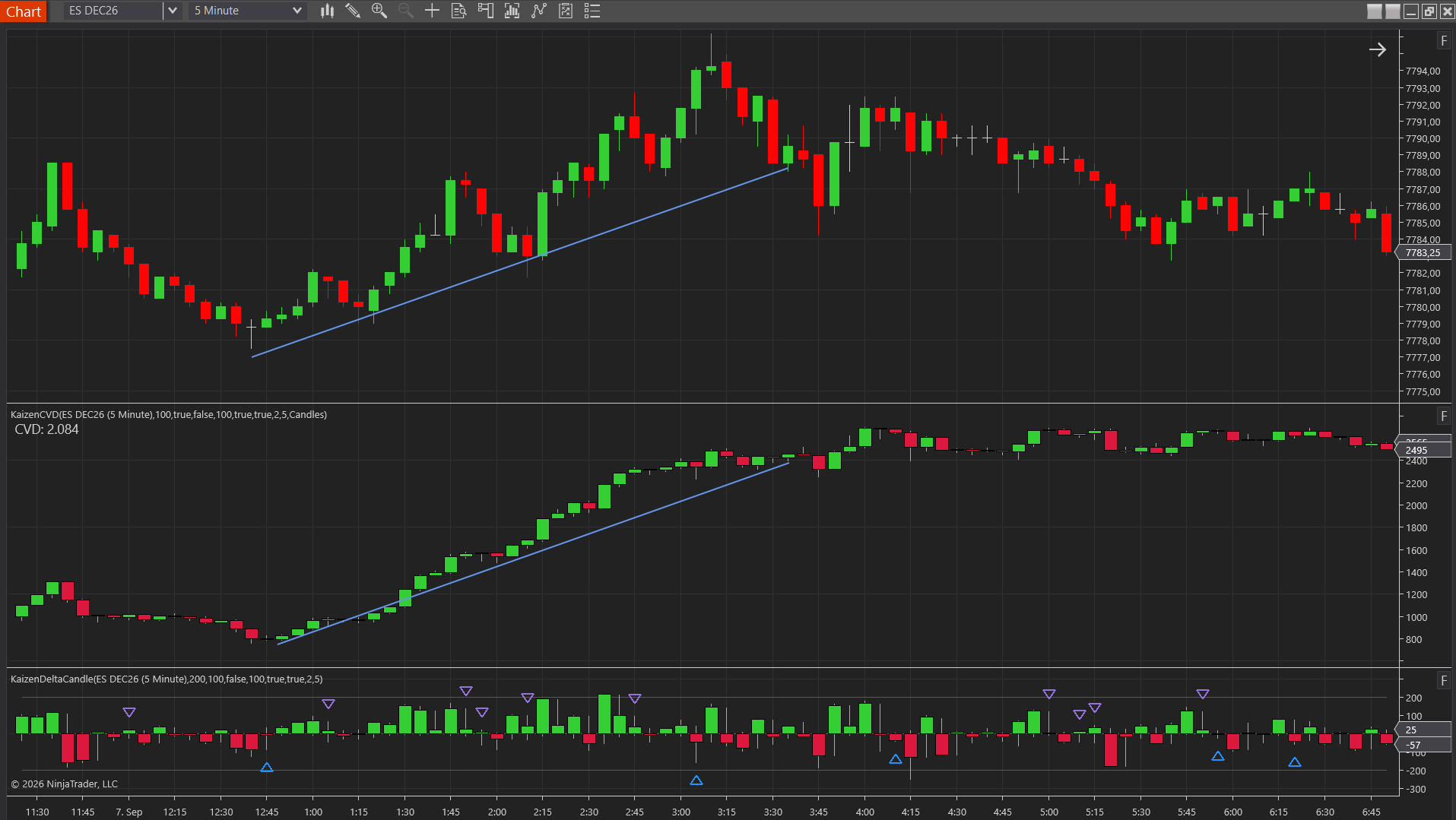
If you are on a budget, this is the category to go free first. Fund an account for Order Flow+ cumulative delta, or install one of the User App Share scripts. Pay for a delta tool when you need something the free versions do not do: per-bar delta candles with absorption detection, delta by price level, or divergence logic you can configure. Our explainer on what delta is in trading shows what each of those adds.
Kaizen CVD
essentialCumulative Volume Delta as candles or line — read buy/sell pressure
$99
Lifetime license
Category 5: Levels, Zones and Drawing Tools
This category covers the tools that mark where to look: untested highs and lows, supply and demand zones, volume clusters, imbalance zones and statistical levels. It is also where the NinjaTrader platform offers the least natively, beyond standard drawing objects.
| Product | Price (seen Sep. 17, 2026) | Trial / refund | Notes |
|---|---|---|---|
| NinjaTrader drawing tools | Free plan | n/a | Manual lines, rectangles, Fibonacci; nothing automatic |
| Kaizen Naked Levels | $99 lifetime | 30-day money-back | Untested session, daily and weekly highs, lows, POC, VAH, VAL; marks mitigation |
| Kaizen Supply Demand | $99 lifetime | 30-day money-back | Zones from 3-bar pivots, multi-timeframe |
| Kaizen Stacked Imbalance | $179 lifetime | 30-day money-back | Stacked bid/ask imbalances projected as zones |
| Kaizen Cluster Search | $179 lifetime | 30-day money-back | High-volume clusters per bar, untested clusters projected forward |
| Kaizen Stats Profile | $179 lifetime | 30-day money-back | Prior-day and overnight levels with historical touch probabilities (ES, NQ, YM, RTY and micros) |
| Craft Indicators Supply Demand Pro | $299 lifetime | Refund policy page exists; terms not verified | Supply and demand zones |
| Craft Indicators Order Block Gen | $399 lifetime | Not verified | Order-block style reversal zones |
| OrderFlowLabs AutoPlot and Liquidity Zones | Paid tier ($199 first month then $249/mo, or quarterly) | Free tier separate | Automatic level plotting |
| ninZa Price Level | Free | n/a | Simple price level drawing tool |
| ninZa LIQ Sweep Hunter | $300 (vendor site) | No refunds, 30-day exchange | Liquidity sweep detection |
| Kaizen Pivot Points | Free, open source | n/a | Classic, Fibonacci, Camarilla and Woodie pivots |
The honest note on this category: automatic zone tools differ mainly in their detection rules, and no vendor publishes a validation of those rules. Judge them by whether the zones they draw match levels you would have drawn yourself, and prefer tools that show why a zone exists (the pivot, the imbalance, the cluster) over tools that only paint rectangles.
Category 6: Alerts, Risk and Order Management
The last category is about execution and discipline rather than analysis. NinjaTrader’s ATM strategies already handle auto breakeven, auto trail and simulated stops for free, so the third-party tools here fill narrower gaps.
| Product | Price (seen Sep. 17, 2026) | Trial / refund | Notes |
|---|---|---|---|
| NinjaTrader ATM Strategies | Free plan | n/a | Auto breakeven, auto trail, simulated stops, bracket templates |
| Kaizen Alert Line | $99 lifetime | 30-day money-back | Sound plus optional Telegram alert when price approaches any horizontal line |
| Kaizen Order Info | $99 lifetime | 30-day money-back | Live stop and target boxes with tick distance, currency and R:R |
| Kaizen StatGrid and Speed of Tape | $99 lifetime each | 30-day money-back | Per-bar statistics grid; tape velocity histogram |
| Affordable Indicators Accounts Dashboard Suite | $495 list; $295 sale seen | All sales final | Daily loss and goal limits, auto-liquidation, trade copier; also for Tradovate and Rithmic |
| SidiChartTrader and SidiLevel 2 (TwinPeaks) | €399 and €79 lifetime plus VAT | Demo available | Chart trading and a Level 2 view |
| ninZa Strategy ManaZer, RapidShape and ATR Ordering | $200 to $250 (vendor site) | No refunds, 30-day exchange | Order management helpers |
| Jigsaw daytradr (Independent Package) | $579 lifetime | 14-day money-back, no questions | A separate DOM-first platform with a NinjaTrader 8 live connection since March 2026 |
If your problem is discipline (overtrading, blowing through a daily loss), a risk dashboard with hard limits is worth more than another indicator. If your problem is missing levels while away from the screen, a Telegram alert on your own drawn lines is the cheapest fix in this whole guide.
Free NinjaTrader 8 Indicators Worth Installing
“Free” comes in three flavors on NinjaTrader 8, and they are not interchangeable.
Free from the platform. The standard indicator library plus, once you fund an account, Order Flow+. This is the best free order flow stack available anywhere, and the reason a funded NinjaTrader Brokerage account is the default recommendation for anyone starting with order flow.
Free from the community (User App Share). NinjaTrader’s User App Share hosts thousands of scripts. Four that stand out in 2026: the NT8-OrderFlow kit (open source, footprint-style visualization plus volume profile, more than 10,000 downloads, but created in 2022 and not actively maintained), Delta Volume (2022, bid/ask delta with optional CVD), LegToLegDeltaProfile (January 2026, delta by price with its own 1-tick series, Tick Replay compatible) and Dynamic Swing Anchored VWAP (October 2025). Read the page before installing: some scripts, such as Order Flow Stats, are free downloads that require NinjaTrader’s Order Flow+ underneath, and older scripts may not compile on the current NinjaTrader build.
Free from commercial vendors. OrderFlowLabs’ Freemium tier (12 studies including anchored VWAP/TWAP, Tape Reader, Delta Towers and a Single Print Detector, no credit card) is the most generous. MZpack and ninZa each publish a smaller set of free indicators. Kaizen’s free tools are four open-source indicators, delivered as source code with no license key: SuperTrend, Pivot Points, Sessions, Opening Range and Initial Balance and a Market Internals dashboard (TICK, ADD, VOLD, TRIN, VIX). None of them is an order flow tool; they are the context layer around one.
How to Choose: Seven Questions Before You Buy
1. Level 1 or Level 2? Footprints, profiles, delta and CVD run on Level 1 tick data with bid/ask state. Only DOM heatmaps, market depth maps and iceberg detection need Level 2. If a vendor cannot tell you which one a product needs, ask before paying; the Level 2 subscription is a recurring cost on top of the indicator.
2. Does it run on the free NinjaTrader plan? MZpack and Affordable Indicators state that their products do. Kaizen indicators compute bid and ask volume from tick data themselves and do not depend on Order Flow+. Add-ons that read NinjaTrader’s Order Flow+ classes need Order Flow+ access.
3. Does your data feed deliver historical bid/ask ticks? NinjaTrader Brokerage, Tradovate, Rithmic, CQG and Kinetick do. Interactive Brokers’ native feed does not supply historical bid/ask tick data inside NinjaTrader 8, so historical footprints will not fill. The data feed guide has the full matrix.
4. Trial or refund? A trial lets you test before paying; a refund window lets you test after. As of September 2026: MZpack (14-day trial), Sidi (14-day demo), OrderFlowLabs (permanent free tier), Kaizen (30-day money-back), Jigsaw (14-day money-back), Bookmap (14-day money-back on a first paid plan). Affordable Indicators, ninZa and BestOrderFlow: all sales final, ninZa with a 30-day exchange.
5. How many machines? Hardware-ID licenses (MZpack, Jigsaw) tie the tool to one computer with paid options for more. Per-PC pricing (Affordable Indicators: $795 vs. $1,275) makes the second machine explicit. Email-bound licenses (Sidi) allow instant switching with one active machine. Every Kaizen license, lifetime or annual, covers two computers out of the box, is re-checked online about once a day and keeps working offline for up to seven days. Moving to a new PC takes one click: reset the activation yourself in the customer portal.
6. Lifetime license or lifetime updates? They are different promises. Kaizen, MZpack, Affordable Indicators and Sidi advertise free updates for life. Jigsaw’s terms state that updates are not guaranteed. Subscription vendors (OrderFlowLabs, BestOrderFlow) include updates while you pay.
7. What is the total cost? Add the data feed (about $4 per month for CME Level 1 as a non-professional through NinjaTrader Brokerage; $34 to $101 per month for Bookmap or Rithmic depth feeds), any Level 2 subscription, and for subscription tools the renewal price rather than the introductory one.
| Vendor | License model | Trial | Refund | Machines |
|---|---|---|---|---|
| Kaizen Daytrading | Lifetime, one-time ($99 to $249; bundle $599 for all 21 tools) or All-Access annual plan ($199/year, same tools) | No | 30 days (lifetime), 7 days (annual plan) | 2 computers included, self-service reset in customer portal, 7 days offline |
| MZpack | Lifetime or €49/mo | 14 days, no card | Not stated | Hardware ID, multi-device options |
| TwinPeaks / Sidi | Lifetime or €18.90/mo | 14-day demo | Not stated | Email-bound, one active machine |
| Affordable Indicators | Lifetime, per PC | No | None (all sales final) | 1 PC or 2 PCs |
| OrderFlowLabs | Subscription (monthly or quarterly) | Free tier | Not stated | Account login |
| ninZa | Lifetime | No | None; 30-day exchange | Not stated |
| BestOrderFlow | Subscription | 30-day paid month | None | Not stated |
| Craft Indicators | Lifetime | Not stated | Policy page, terms not verified | Not stated |
| Bookmap | Subscription or lifetime, data separate | Free Digital tier | 14 days on first paid plan | Deactivate old machine first |
| Jigsaw | Lifetime | No | 14 days | Machine ID |
Our Picks by Situation
You are starting with order flow on a small budget. Fund a NinjaTrader Brokerage account, use Order Flow+ volumetric bars and cumulative delta, add LegToLegDeltaProfile and the OrderFlowLabs free anchored VWAP. Total software cost: zero. Buy a paid footprint only when you know which feature you are missing.
You want to test before spending. MZpack (14-day full trial) or SidiFootprint (14-day demo). Both are European vendors, both price in euros plus VAT for EU buyers.
You want everything inside one NinjaTrader chart. This is the segment where Kaizen competes: 21 indicators, $99 to $249 each, $599 for the Complete Bundle as a lifetime license with updates, or the same 21 tools as an All-Access annual plan for $199 a year. There is no trial; instead there is a 30-day money-back window on lifetime purchases and 7 days on the annual plan. MZpack’s €399 package is the closest alternative with six indicators and a trial. Affordable Indicators covers similar ground at a higher price with no refunds.
You trade the DOM and want a heatmap. That is a platform decision, not an indicator decision: Bookmap (from $49 per month or $990 lifetime, plus data) or Jigsaw daytradr ($579 lifetime). Budget for Level 2 data and for the time to learn a second application.
You need discipline more than analysis. A risk dashboard with hard daily limits (Affordable Indicators’ Accounts Dashboard, or the free ATM strategies configured strictly) will do more for your results than any indicator on this page.
Bundle & Save
Complete Bundle
All 21 tools at the best price
$599
$2789
Save79%
Frequently Asked Questions
What indicators does NinjaTrader 8 include for free?
The free plan ships with the full standard indicator library, advanced charting, drawing tools, backtesting and simulation. The Order Flow+ suite is separate: it unlocks with a funded live NinjaTrader Brokerage or Tradovate account, is included with the $1,499 Lifetime license, or costs $59 per month as a standalone add-on.
Do I need the NinjaTrader Lifetime license for third-party order flow indicators?
No. Indicators that compute bid and ask volume from tick data themselves run on the free plan with a suitable data feed. Only add-ons built on NinjaTrader’s own Order Flow+ classes need Order Flow+ access.
Level 1 or Level 2: which do I need?
Level 1 tick data with bid/ask state for footprints, profiles, delta and CVD. Level 2 only for DOM heatmaps, depth maps and iceberg detection.
Which vendors offer a free trial?
MZpack (14 days, no card) and Sidi (14-day demo) as of September 2026. OrderFlowLabs has a permanent free tier. Kaizen and Jigsaw offer money-back windows instead. Affordable Indicators, ninZa and BestOrderFlow state all sales are final.
Is a lifetime license the same as lifetime updates?
Not always. Kaizen, MZpack, Affordable Indicators and Sidi advertise free updates; Jigsaw’s terms say updates are not guaranteed. Read the update clause.
Can I run one license on desktop, laptop and VPS?
Vendor dependent: hardware ID (MZpack, Jigsaw), per PC (Affordable Indicators), email-bound with one active machine (Sidi), deactivate-then-activate (Bookmap). Kaizen includes two computers with every license and lets you reset an activation yourself in the customer portal. Check before buying if you use more than one computer.
What is the cheapest way to get order flow charts on NinjaTrader 8?
A funded NinjaTrader Brokerage account: Order Flow+ then costs nothing extra, CME Level 1 data runs about $4 per month for non-professionals, and free User App Share scripts add delta-by-price and footprint-style views on top.
Prices and policies were checked on the vendors’ own websites on Sep. 17, 2026 and can change at any time; sale prices are marked as such. ninZa’s site blocks automated checks, so its prices are quoted from the vendor pages as recorded on that date. We sell NinjaTrader 8 indicators, so treat the Kaizen rows as a vendor’s own listing and compare them the way you would any other row.