KaizenOrderInfo
KaizenOrderInfo draws your live orders and position on the chart: colored boxes with quantity, distance in ticks and currency, risk-to-reward ratio and the running PnL.
Updated: July 1, 2026
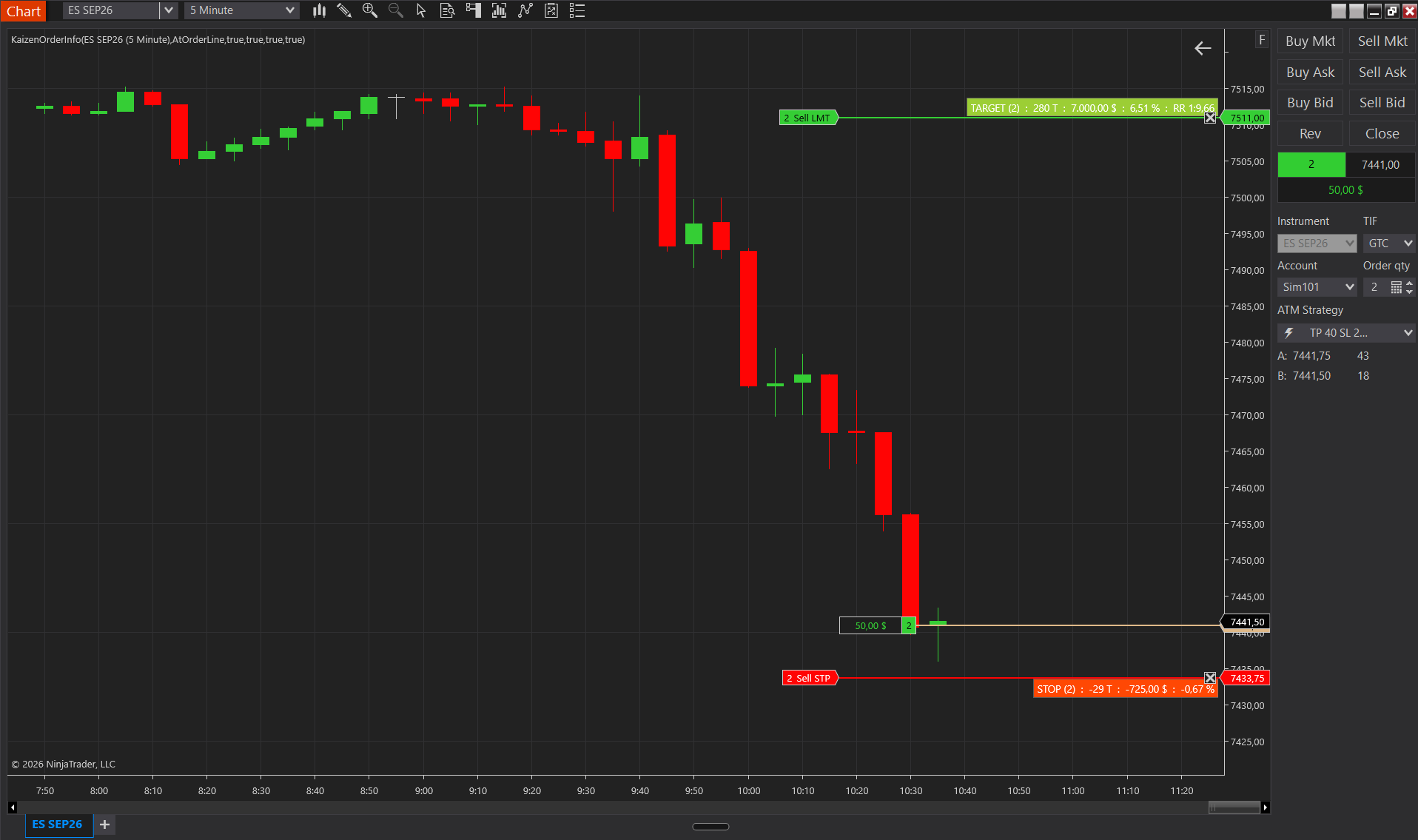
KaizenOrderInfo is an on-chart visualization of live orders and position. For each working order on the chart’s instrument (stops, limits, MIT), the indicator paints a colored box with the quantity, the distance from entry in ticks, the unrealized P&L, the % of account risk, and the risk/reward ratio on the target side. It updates automatically within ~100 ms of any order fill or account P&L change.
Interpretation
- Stop box (orange-red by default) at its price level shows “STOP (qty) : N T : $X : Y% : …”: how far away the stop is, how much it costs if executed, and the % of account.
- Target box (yellow-green by default) shows the corresponding target data plus RR 1:X.XX, the reward/risk ratio computed as ticks to target ÷ ticks to stop.
- Multiple orders at the same price are aggregated into a single box with the total quantity.
- Only orders opposite to the current position are rendered (shorts show buy stops/targets, longs show sell stops/targets). Flat position = nothing rendered.
- Automatically hidden when NinjaTrader’s ChartTrader panel is closed, which prevents confusion during chart-only analysis.
- The % of account uses AccountItem.CashValue; if the account value cannot be obtained, this metric is silently omitted. Not visible on paper-trading accounts with a $0 value.
Settings
Display
- Show Ticks — adds : N T (ticks from entry) to each box.
- Show Currency — adds the P&L in base currency (for example : $200.00). Computes the theoretical P&L if the order executes at its price.
- Show % of Account — adds : 2.00%, the fraction of the account cash that the order’s P&L represents. The most actionable risk metric.
- Show RR Ratio — adds : RR 1:X.XX only to target orders. Uses the first stop; if there is no stop, the RR is omitted.
- Box Position — At Order Line (default: boxes at each order’s price, targets above and stops below). Top/Bottom Left/Right = stacks all boxes in a corner (better on dense charts with many orders).
Colors
- Stop Fill — background of the stop boxes. Default OrangeRed.
- Target Fill — background of the target boxes. Default YellowGreen.
- Text Color — text inside the boxes. Default White.
Don't own it yet?
Lifetime license, no subscription.