KaizenVWAP
KaizenVWAP computes the session volume-weighted average price with up to three standard-deviation bands, directional coloring and cloud fills. Settings and usage explained.
Updated: July 1, 2026
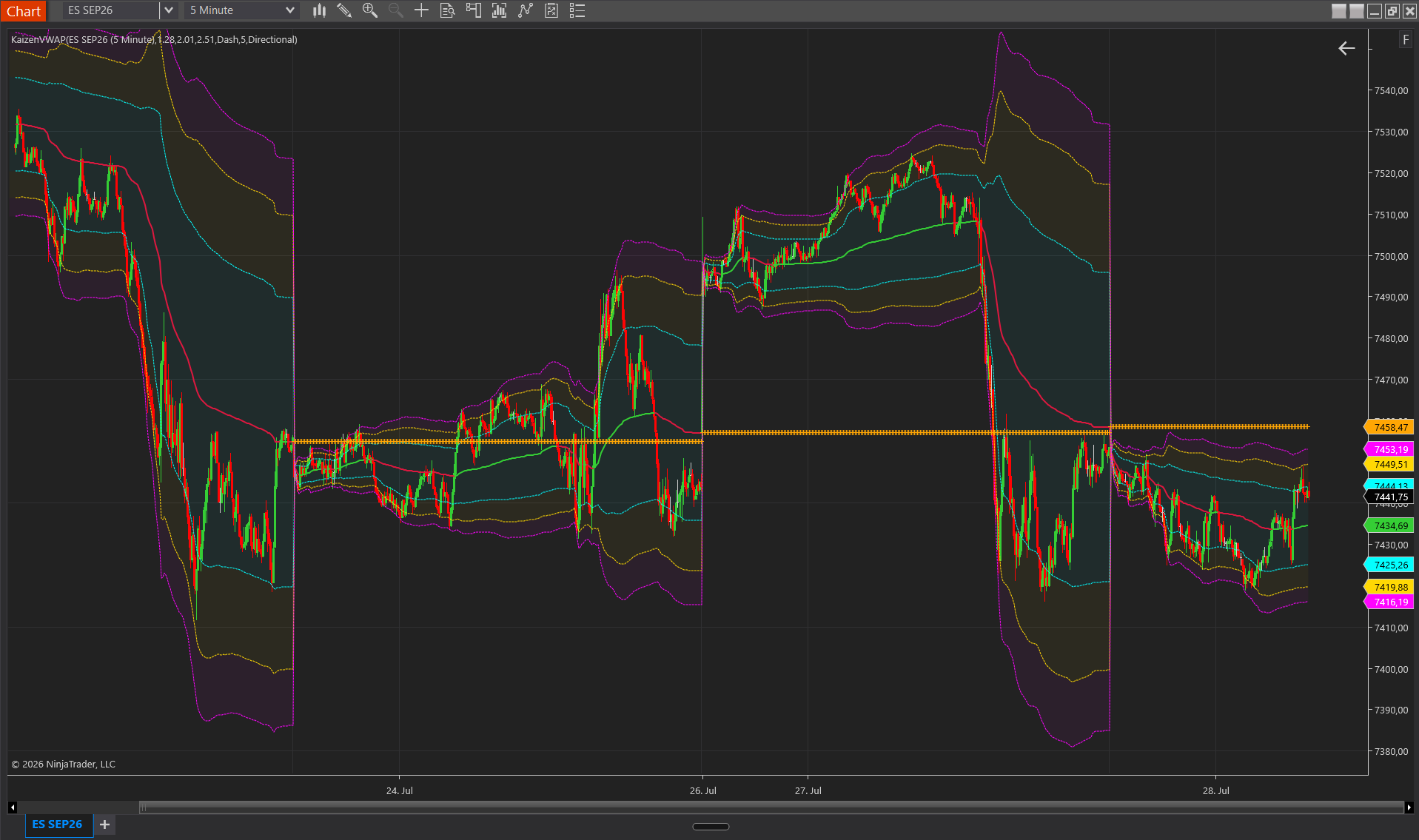
KaizenVWAP computes the Volume-Weighted Average Price for the current session with up to 3 standard-deviation bands. Each tick contributes typical_price × volume to a running numerator and volume to a running denominator; VWAP = numerator / denominator. The indicator resets at each session start, optionally plots the previous session’s final VWAP as a reference cross, and can color the VWAP line directionally based on its slope.
Interpretation
- VWAP as an institutional anchor — large desks benchmark their fills against the VWAP. Price above VWAP = bullish acceptance of the session; below = bearish acceptance.
- Bands 1 / 2 / 3 (default 1.28σ / 2.01σ / 2.51σ) = progressively extreme zones. Price at Band 1 is statistically somewhat stretched; at Band 3 it is usually exhausted or mean-reverting.
- VWAP slope = intra-session momentum. In directional mode the VWAP color changes when the slope reverses, an early signal that the institutional average is turning.
- Previous session’s VWAP = horizontal reference. An overnight gap that opens above the PriorVWAP usually indicates risk-on; below = risk-off. Useful in the first 15 minutes of the session.
- Band squeeze (σ bands narrowing) = low recent variance, often a precursor to a breakout.
Settings
Calculation
- VWAP Style — Standard = a single static color. Directional = the VWAP line is recolored bullish or bearish based on the slope sign (current VWAP > previous VWAP = bullish).
- Band 1 Multiplier — σ multiplier for the innermost band. Default 1.28 (≈ 1σ in a normal distribution).
- Band 2 Multiplier — default 2.01 (≈ 2σ).
- Band 3 Multiplier — default 2.51 (≈ 2.5σ). Raise it to make the outer band harder to reach.
Visuals
- Show Band 1 / 2 / 3 — independent toggles: show only Band 1 for a clean chart, or all three for full context.
- Show Band Cloud — fills the zones between bands with a semi-transparent color. Off = lines only.
- Band Cloud Opacity % — transparency of the cloud fills. Default 5 (very subtle). Raise it to 20–30 if you want the cloud visible without dominating.
- Show Prior Session VWAP — plots yesterday’s final VWAP as a horizontal cross marker, useful for gap analysis.
Colors
- VWAP Color (Up) — color of the VWAP line when the slope is positive (directional mode only).
- VWAP Color (Down) — color of the VWAP line when the slope is negative (directional mode only).
- Band 1 / 2 / 3 Color — independent colors for each band line.
- Cloud Color — fill color between bands.
Don't own it yet?
Lifetime license, no subscription.