KaizenSupplyDemand
KaizenSupplyDemand builds supply and demand zones from confirmed 3-bar pivots, sizes each zone by the pivot wick and keeps it on the chart until price returns to mitigate it.
Updated: July 1, 2026
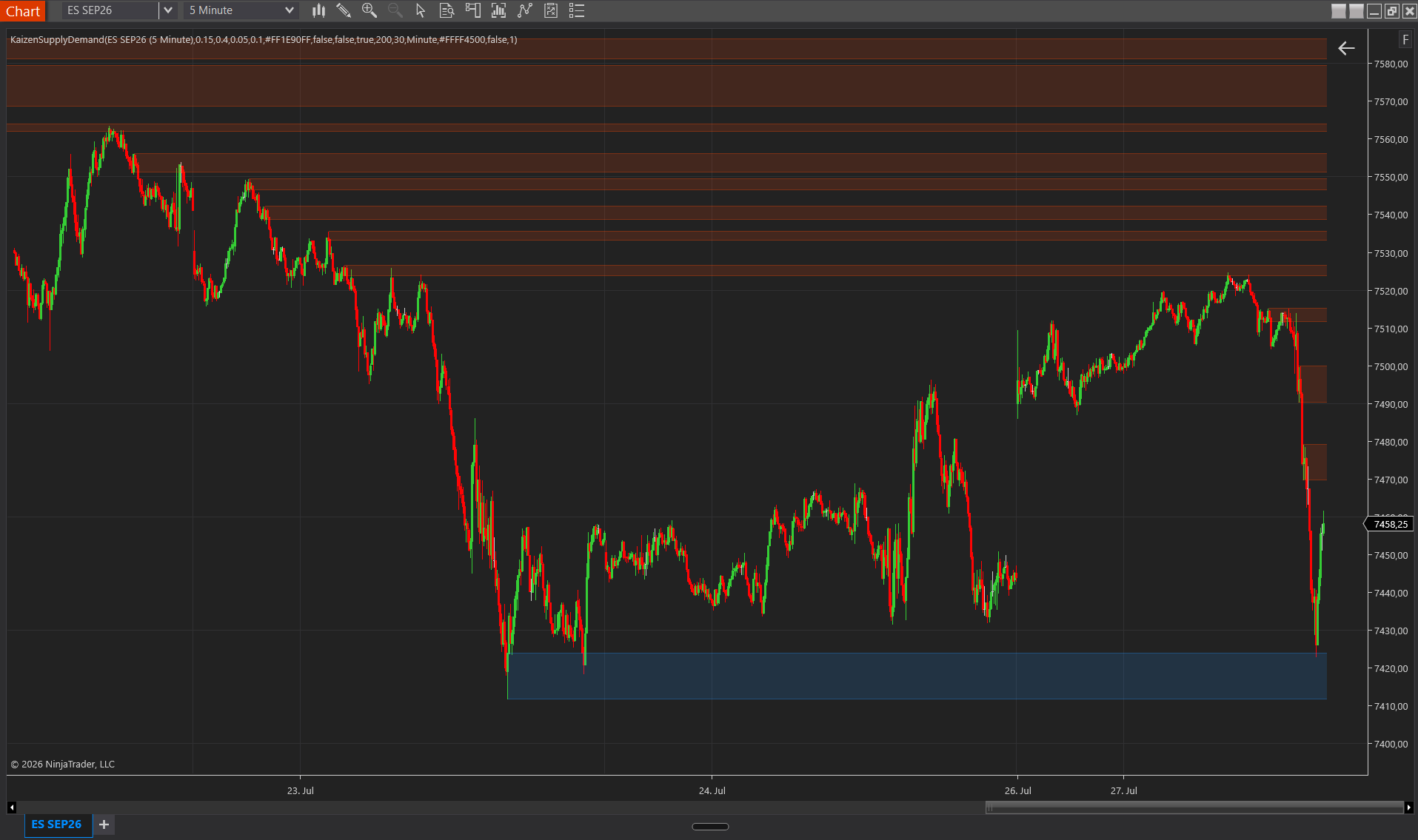
KaizenSupplyDemand detects Supply and Demand zones from 3-bar pivots. When a 3-bar swing is confirmed, the engine creates a zone: its level is set at the pivot price and its width depends on the pivot bar’s wick. If the wick exceeds ~1.25 ATR, the body marks the zone edge (a clean rejection wick); if not, the body boundary is used (a basing candle). The engine also recognizes continuation-pattern zones (drop-base-drop for supply, rally-base-rally for demand). Zones are marked as broken when price closes through them. It supports multi-timeframe: detect on 30min while plotting on 5min.
Interpretation
- An active demand zone (blue) = an unbroken buying zone. Price approaching from above is likely to bounce here.
- An active supply zone (red) = an unbroken selling zone. Price approaching from below is likely to reject here.
- Broken zones lose validity but are often revisited as opposite structure (a broken demand sometimes flips to supply on the retest).
- Wick-based widths capture clean rejections; body-based widths capture basing candles. The engine chooses automatically based on the 1.25 ATR wick test.
- Multi-timeframe zones are generally stronger because they represent higher-timeframe structure projected onto your execution chart.
Settings
Multi-Timeframe
- Use MTF — enables detection on a timeframe different from the chart’s. Off by default.
- Bar Type — Minute / Hour / Day / Week. Used only when MTF is on.
- Bar Period — units of the MTF. Default 30 (= 30 minutes when Bar Type = Minute).
Zone Display
- Demand Color — default DodgerBlue.
- Supply Color — default OrangeRed.
- Active Line Opacity — opacity of the border of unbroken zones, 0–1. Default 0.40.
- Active Area Opacity — fill opacity of unbroken zones, 0–1. Default 0.15 (lets price through without masking it).
- Broken Line Opacity — border opacity of broken zones. Default 0.10.
- Broken Area Opacity — fill opacity of broken zones. Default 0.05.
- Line Width — thickness in pixels of the zone borders, 1–5.
- Extend Zones — active zones extend from their origin bar to the current right edge (lets you scan all live zones). Off by default.
Visibility
- Hide Active Zones — hides unbroken zones (useful for retrospective review of broken ones only).
- Hide Broken Zones — hides broken zones (cleaner live chart). On by default.
Performance
- Max Zone Count — memory limit for stored zones. Default 200. The oldest broken zones are pruned first.