KaizenReversalIndicator
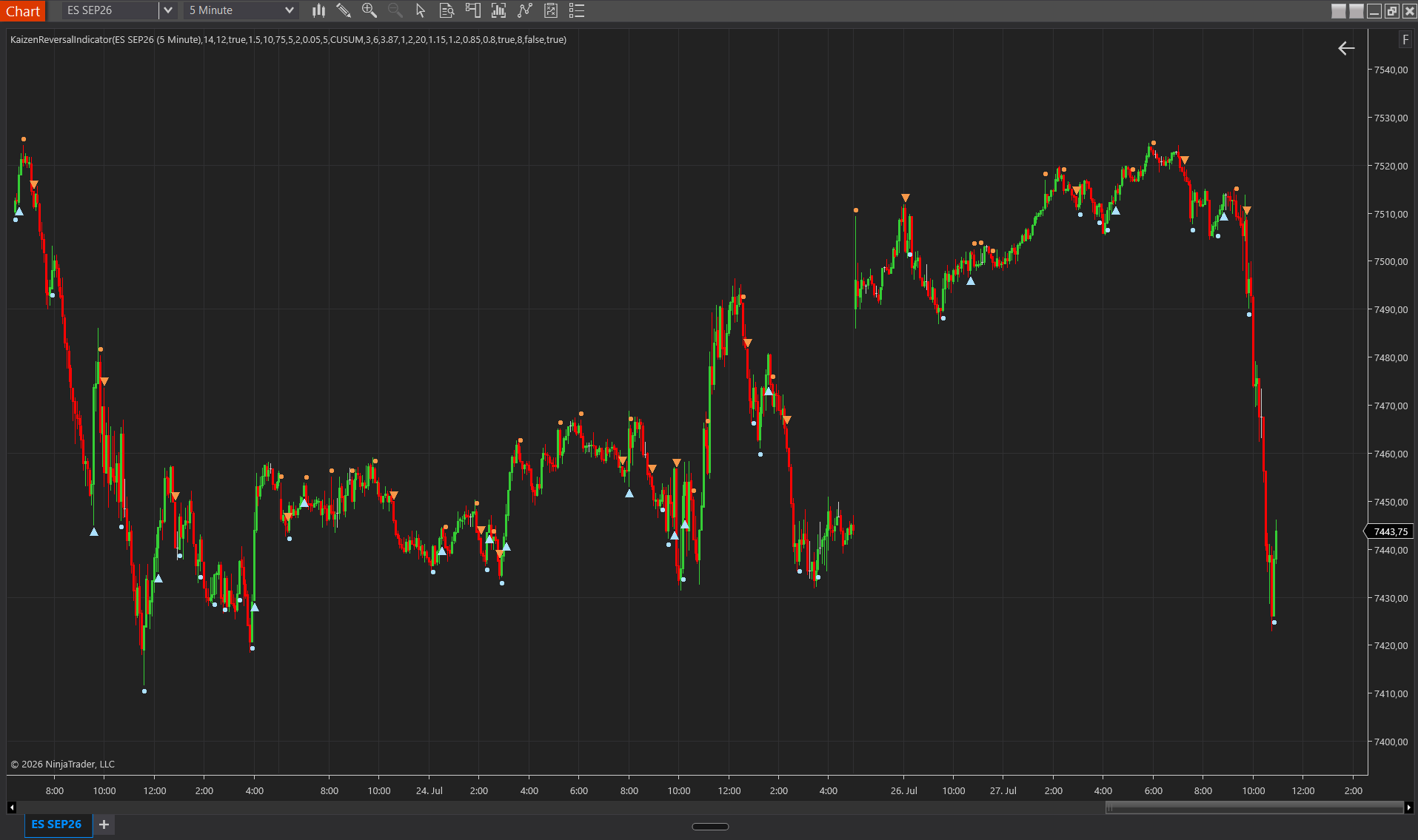
KaizenReversalIndicator detects swing reversals in real time using CUSUM (Page-Hinkley) evidence across bars, with ATR scaling, optional delta confirmation and chart alerts.
Updated: July 1, 2026
KaizenReversalIndicator detects swing reversals in real time. v1.8 uses CUSUM detection (Page-Hinkley algorithm) by default: it accumulates drift evidence over multiple bars and fires the reversal signal when the accumulated evidence exceeds a threshold. In addition, a magnitude filter (Min Signal Swing ATR) filters out micro-reversals, so the signal only fires if price has retraced substantially from the extreme.
What’s new in v1.8
- CUSUM detection as the new default (vs the old ATR heuristic).
- Magnitude filter Min Signal Swing ATR (default 2.0; on NQ M5 use 8-10 for “major swings only”).
- Dynamic AutoFilter, multi-session memory and per-instrument defaults (ES/NQ/GC), enabled by default.
- Volatility-regime multiplier (adjusts the threshold in high-vol and low-vol phases automatically).
- Calculate = OnBarClose by default: arrows and dots appear only after the bar closes (no intra-bar repainting).
- Simplified properties dialog in Basic / Advanced / Visual groups; the standard user only needs the 3 properties in “1. Filter (Basic)”.
Interpretation
- An arrow = a confirmed reversal signal; a dot = an early alert before the arrow. Aggressive traders enter on the dots; patient traders on the arrows.
- CUSUM mode (default) detects reversals earlier than the ATR heuristic via multi-bar drift evidence. The magnitude filter ensures that only substantial swings are reported.
- Use as confluence: the signal works best as confirmation of other signals (Supply/Demand zones, VWAP, Footprint imbalances). It is not designed as a sole trading trigger.
- AutoFilter calibrates the threshold per session adaptively, based on the measured reversal distribution. The multi-session memory smooths day-to-day variation.
Settings
1. Filter (Basic)
Core properties, sufficient for most users.
- Filter — manual threshold with an ATR multiplier. Default 3.87. When Auto Filter is on, this value is dynamically overridden.
- Auto Filter — enables dynamic per-session filter calibration based on the reversal distribution. On by default (v1.8).
- Min Signal Swing (ATR) — magnitude filter (CUSUM mode): the signal only fires when price has retraced ≥ N × ATR from the extreme. Default 2.0. NQ recommendation for major-swings-only: 8-10. 0 = filter off.
2. Dots (Basic)
Secondary early-alert signals.
- Dot Threshold (ATR) — threshold for the early-alert dot. Default 1.0. It must be lower than the effective arrow threshold so the dots precede the arrows.
- Dot Cooldown (bars) — minimum bars between consecutive dots. Default 3.
3. AutoFilter (Advanced)
Tuning of the adaptive filtering.
- Auto Filter Percentile — percentile of the reversal distribution for the dynamic threshold. Default 75. 50 = median (many signals); 90 = top 10% (very conservative).
- Auto Filter Min Samples — minimum samples before Auto Filter activates. Default 10 (cold-start protection).
- AutoFilter Session Memory — number of previous sessions used as a fallback pool when the current session does not have enough samples. Default 5.
- AutoFilter Floor Multiplier — lower bound for Auto Filter (multiple of the Dot Threshold). Default 1.5.
- Use Instrument Defaults — loads instrument-specific filter defaults (ES=3.87, NQ=3.50, GC=4.00, CL=4.20, etc.) based on the MasterInstrument. On by default.
- ATR Period — lookback for the ATR calculation. Default 14. Rarely changed.
4. Volatility Regime (Advanced)
Adaptation to current volatility.
- Regime Multiplier Enabled — enables volatility-regime detection. On by default.
- Regime ATR Session Period — lookback (sessions) for the median-ATR calculation. Default 20.
- High-Vol Threshold (ratio) — current ATR / median ATR > X = high-vol. Default 1.20.
- Low-Vol Threshold (ratio) — current ATR / median ATR < X = low-vol. Default 0.80.
- High-Vol Multiplier — threshold multiplier in high-vol phases. Default 1.15 (more conservative = fewer signals).
- Low-Vol Multiplier — threshold multiplier in low-vol phases. Default 0.85 (more sensitive = more signals).
5. Detection Mode (Advanced)
Algorithm choice.
- Detection Mode — CUSUM (default) = multi-bar drift accumulation (Page-Hinkley). ATRSimple = the classic single-bar heuristic from v1.7 (for users who prefer the old behavior).
- CUSUM K (slack) — slack parameter. Lower = more accumulation per bar. Default 0.05.
- CUSUM H (threshold) — alarm threshold for the accumulated drift. Default 2.0. Higher = fewer signals, more lag.
6. Delta Filter (Advanced)
Optional CVD confirmation.
- Use Delta Filter — requires CVD rotation in the direction of the reversal before signaling. Off by default. Needs Calculate OnEachTick mode plus tick data (bid/ask).
- Delta Lookback — bars checked for CVD rotation. Default 5. Higher = slower rotation requirement.
7. Visual
- Buy / Sell Color — arrow and dot colors. Default light blue / orange.
- Arrow Size — size of the arrow triangle in px. Default 12.
- Dot Size — size of the dot circle in px. Default 6 (subtle; the dots are early alerts).
- Signal Offset — vertical offset in pixels from the signal price (prevents overlap with the wicks). Default 8.